Change log

Every Copia release, newest first. 94 releases so far.

Latest releasev1.61.1Pending charges stop counting twice
v1.61.1

Pending charges stop counting twice

A round of fixes, led by one we heard about: a card purchase showing up twice while it went from pending to posted. Mobile changes arrive with app version 1.61.1.

Transactions

  • A pending charge now goes away when your bank posts it, so the purchase no longer shows up twice. This includes banks that post the charge a day later as a new transaction.
  • Transactions on the same day now list in the order your bank reported them, newest first, instead of a random order.

Payoff

  • Saving an interest rate or minimum payment no longer changes the account's other details, so bank-linked accounts keep syncing their transactions.

Receipts

  • Receipt thumbnails no longer reload every time you sort or filter the Receipts list.
  • Sorting the Receipts table back and forth no longer crashes the page when a receipt is a PDF.

Mina

  • Insight cards that rank what went up or down now load their trend tab and drill-downs instead of showing "Couldn't load this card".

Improvements

  • Create AI budget now shows a lock on the free plan and opens Billing, instead of failing with a generic error.
  • The menu under your name shows one version number instead of two.
v1.61.0

Search and sort your receipts

Receipts

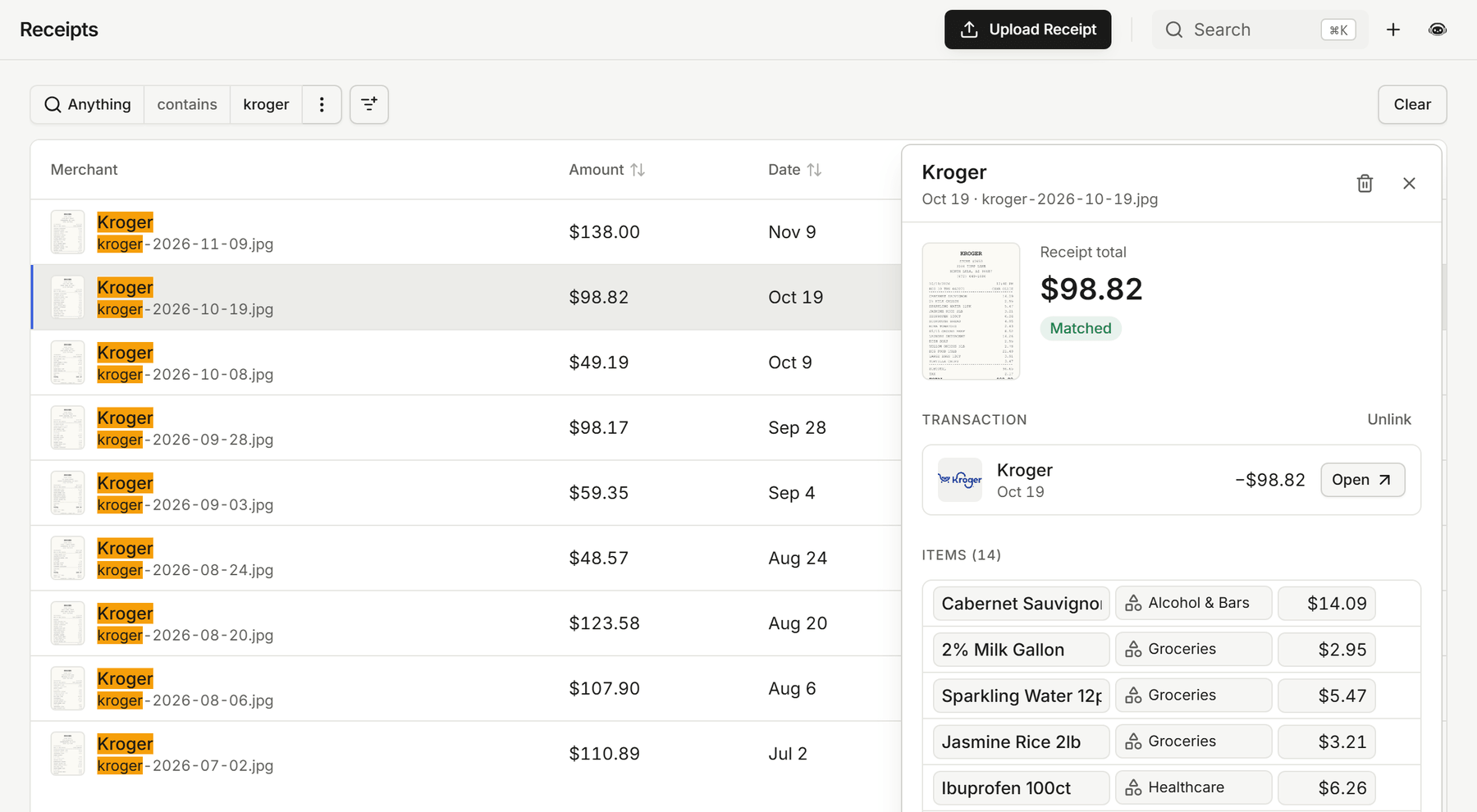
  • Press Ctrl+F to search every receipt at once, by merchant, file name, or amount. Matches are highlighted in the list.
  • Sort receipts by amount, receipt date, status, or upload date, across your whole history.
  • Your filters stay in the page link, so a refresh or a shared link opens the same list. The receipt you have open is marked in the list.
  • A receipt you just uploaded updates on its own when it finishes reading, instead of showing "Processing" until you refresh.
  • Catch-up on the dashboard tells you about receipts that were matched to their transactions while you were away.

The Receipts list searched for "kroger", with every match highlighted, the open receipt marked in the list, and its details beside it

Recurring

  • Ctrl+F searches the Recurring list too, the filters stay in the link, and the open bill or paycheck is marked in the list.
  • Recurring keeps tracking a bill or paycheck when it changes how it shows up on your statement, such as a biller moving from a bank debit to an online payment or an employer moving to a payroll provider.
  • Recurring now refreshes every account nightly, so bills stay current even when nothing new syncs.

Payoff

  • Edit a debt's interest rate right in the Payoff accounts table, just like its minimum payment. This works on the web now and in the mobile app with version 1.61.0.

Mina

  • Following a link in a Mina reply gets the chat out of the way. On your phone the chat closes; on desktop, full screen shrinks to the chat panel.
  • Mina's charts and tables show up more reliably, and questions that combine "and" and "or" conditions get better answers.

Improvements

  • The category filter on Transactions opens in a moment instead of up to a minute, and one slow page no longer holds up the others.
  • Split, receipt, rule, and tag chips on transaction rows fit on one tidy line at any width.
  • Long total labels in Insights no longer spill over the amounts on narrow screens.
  • The text and number filter editors draw their focus outline neatly around the field.
v1.60.0

Mina compares your rates to the national average

Mina

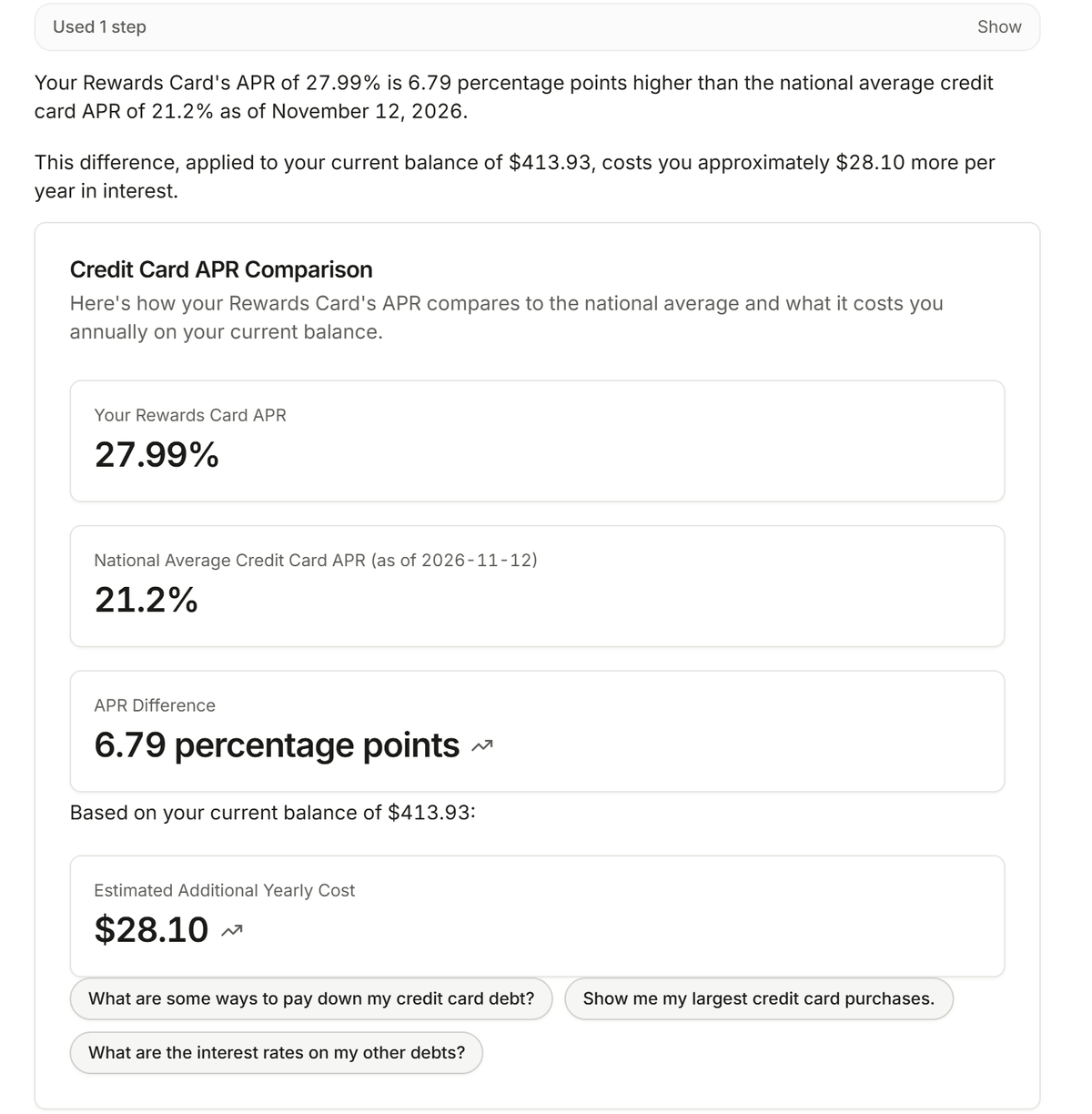
  • Ask Mina whether your mortgage, car loan, or credit card rate is high. It compares your rate with today's national average and works out what the difference costs you each year on your balance.
  • Mina can explain why prices feel higher with current figures for inflation, groceries, gas, and electricity, and compare them with a year ago.
  • These figures come from official sources like the Federal Reserve and the Bureau of Labor Statistics. Mina looks them up on its own and never sends your data to do it.

Mina comparing a Rewards Card APR of 27.99% with the national average of 21.2%, a difference that costs about $28.10 a year on the current balance

Improvements

  • Opening a page right after we ship an update no longer shows an error. Copia reloads once to pick up the new version.
v1.59.0

Rate Mina and ask about today's rates

Mina

  • Every Mina reply has a thumbs up and a thumbs down. A thumbs down takes an optional note, so you can tell us what Mina got wrong.
  • Mina can quote today's top high-yield savings, CD, and credit card offers and turn them into next steps, like how much more your idle cash could earn somewhere else. It looks up rates on its own and never sends your data to do it.
  • Chart and pie cards, including ones pinned to your dashboard, show View transactions inside the card, and pinned chart widgets show their menu so you can remove them.
  • View transactions on a card with a rolling period, like the last 12 months, opens a date filter that keeps rolling instead of fixed start and end dates.

Bank linking

  • If linking a bank fails partway through, you now see an error instead of a link that looks finished but never shows up. Linking that bank again starts fresh.

Your account

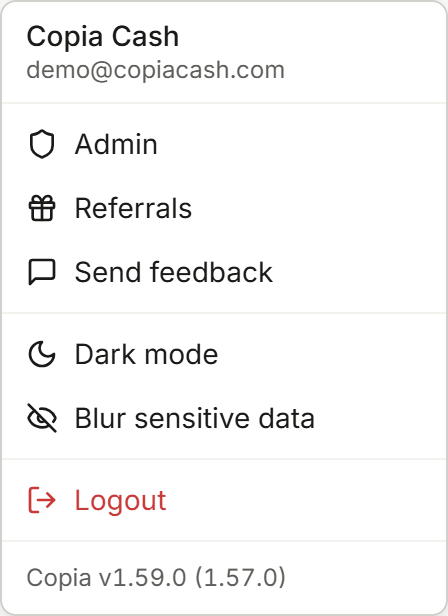
  • The menu under your name shows which version of Copia you're running. Tap it to see what's new in that version.

The menu under the name Copia Cash, ending with the line Copia v1.59.0 (1.57.0)

Website

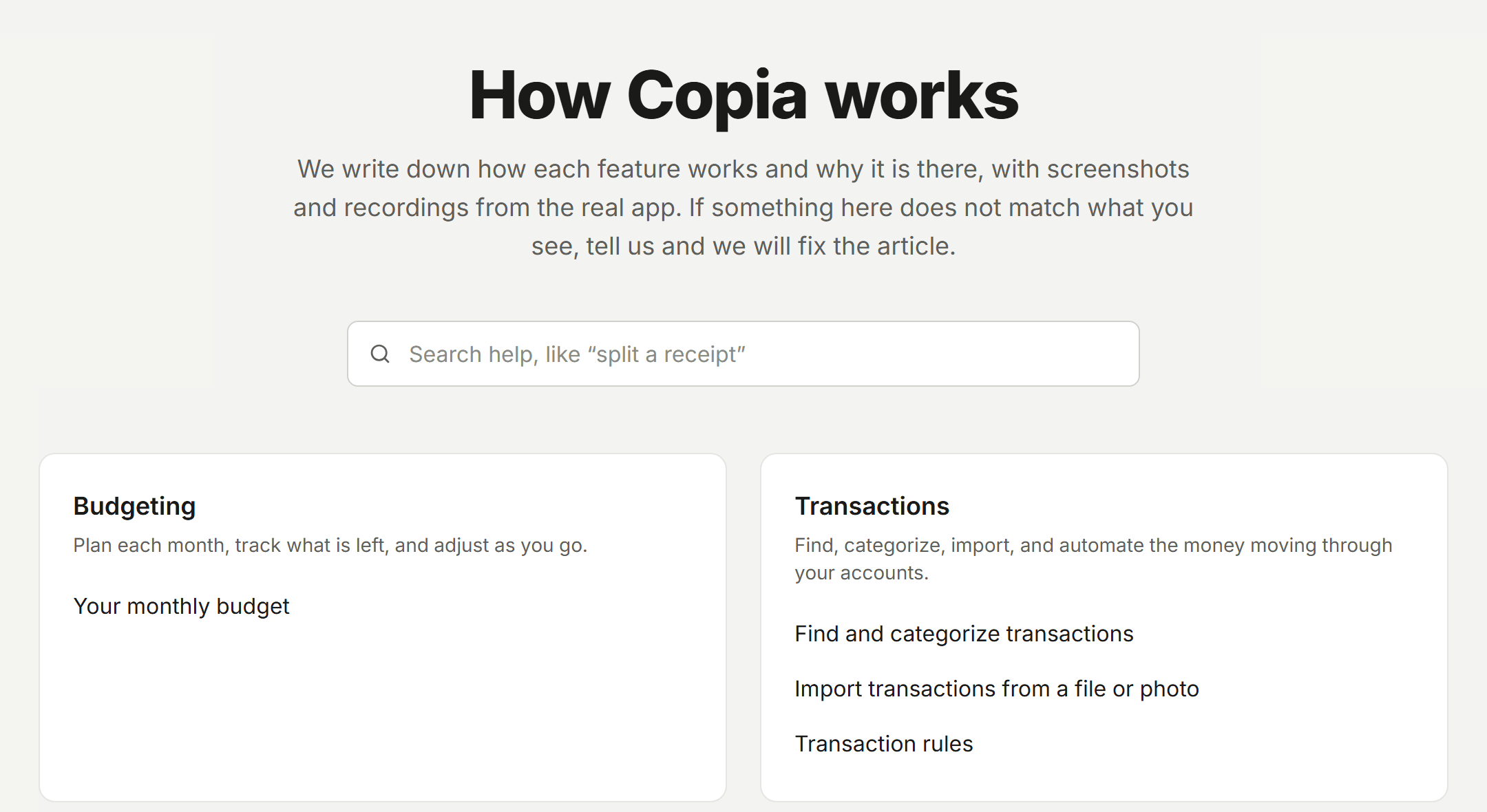
  • The new help center at copiacash.com/help explains how budgeting, transactions, imports, rules, receipts, and the calendar work, with screenshots and recordings from the real app. The FAQ now sits at the bottom of it.
  • The homepage shows every way a receipt gets into Copia (a photo, a forwarded email, or a dropped file) and follows one grocery receipt all the way to your budget.

The help center page titled How Copia works, with a search box and cards for Budgeting and Transactions

iPhone app

  • Rating Mina's replies and the version in your user menu arrive in the iPhone app from version 1.59.0.
v1.58.0

Merge duplicate bank charges in Catch-up

Catch-up

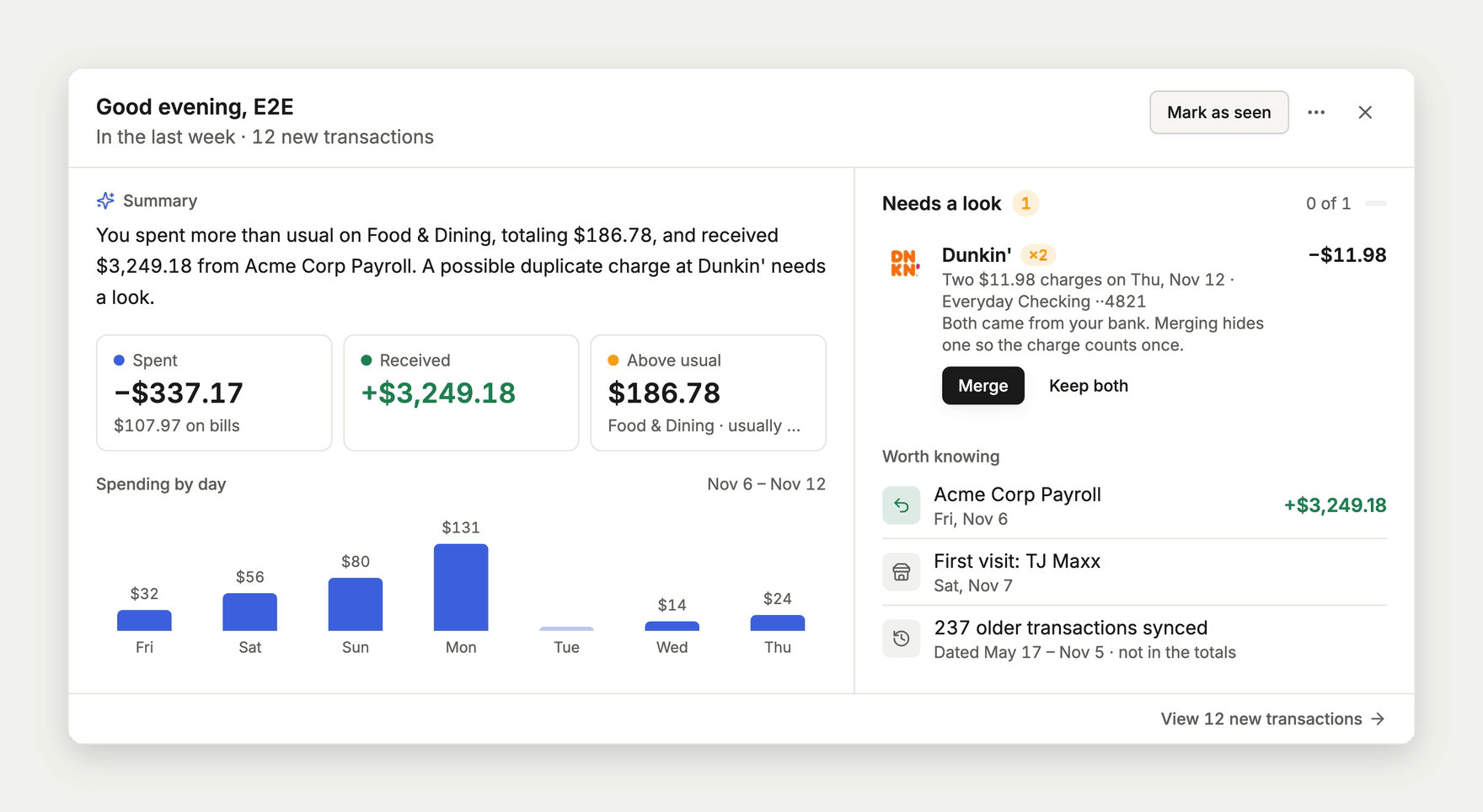
  • When your bank sends the same charge twice, Catch-up offers Merge so the purchase counts once in your lists, totals, and budgets. Undo brings the hidden charge back.
  • A merged charge stays hidden after your bank syncs again.

The Catch-up card on the dashboard with two matching $11.98 Dunkin' charges under Needs a look, and Merge and Keep both buttons

Transactions

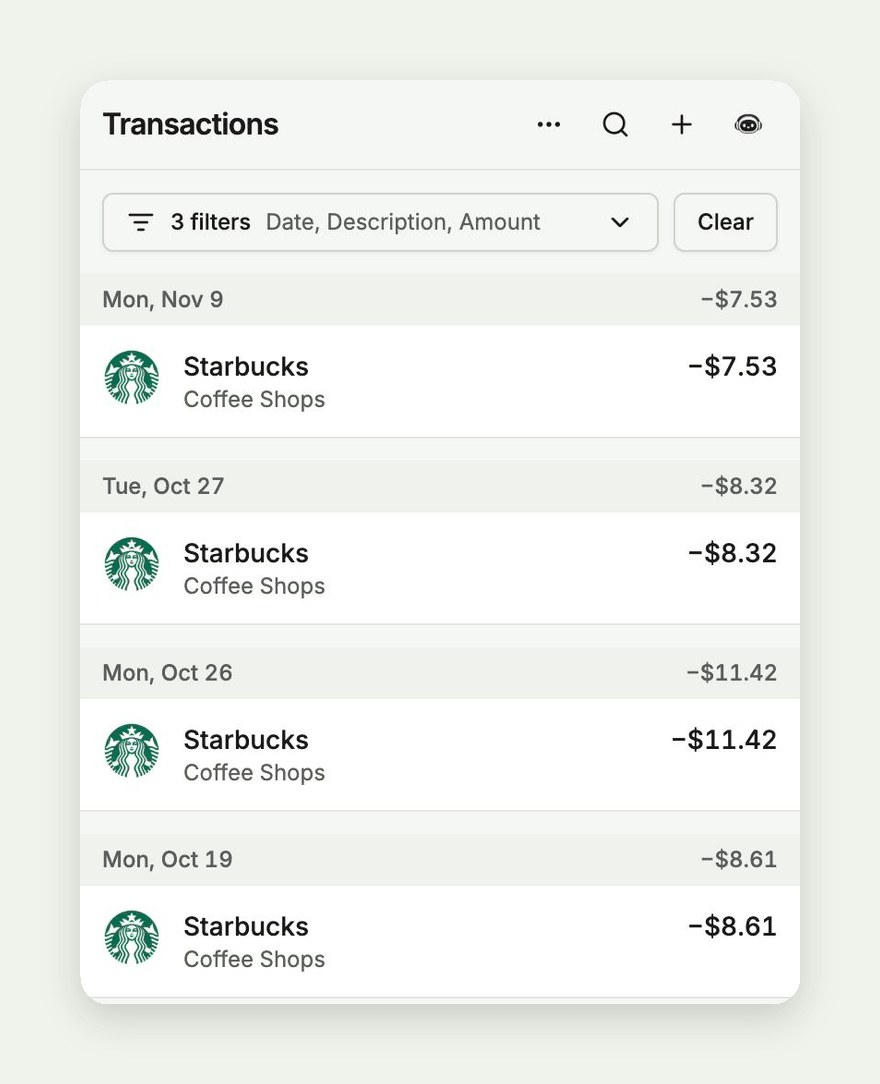
  • On phones, filters you arrive with from a link or from Mina fold into one line, like "3 filters ยท Date, Description, Amount", so the list stays on screen. Tap the line to open them, or the arrow to fold them back. Receipts and Recurring work the same way.
  • Resetting transactions to their bank data works again, whether you pick specific transactions or reset everything matching a filter.
  • Date range calendars leave space between the two months, so tapping the last day of one month no longer picks a day in the next.

Transactions on a phone with three filters folded into one line reading 3 filters, Date, Description, Amount, above a list of Starbucks purchases

Importing

  • Importing a CSV or bank file no longer stops at the merchant step when you don't have a subscription. Merchants Copia already knows are matched as before, and you pick the rest in review.

Accounts and debt

  • Recording a credit card payment by hand now lowers the card's balance, and your balance history and debt budgets count it as a payment instead of new spending.
  • Editing a linked account's name or debt terms no longer stops it from syncing.
  • Accounts your bank sends without account digits now sync, and renaming a bank keeps its accounts matched to it.

Mina

  • Mina asks which category you mean before offering to add, change, or remove a budget, instead of showing a confirmation that fails when you approve it.

iPhone app

  • Merging duplicate charges and the folded phone filters arrive in the iPhone app from version 1.58.0.
v1.57.1

PDF receipts open on Android

Receipts

  • PDF receipts show their pages on Android phones, in Brave, Chrome, and other browsers, instead of a blank Open button.

Setup

  • Subscribing during setup confirms right away. If your card is declined, you see the reason and can try another card.
  • If confirming takes longer than usual, you see a note instead of a loading screen that never ends.

Recurring

  • Your bills no longer show as ended when a bank connection stops syncing.
  • Your recurring list now updates on its own when Copia gets better at spotting bills, even if nothing new has synced.

iPhone app

  • Signing out takes you to the sign-in screen, even if you created your account in that same session. This arrives in the iPhone app from version 1.57.1.

Security

  • We updated two libraries Copia uses for reading files and secure connections to versions that fix known security issues.
v1.57.0

A dashboard that shows what is coming

A brand new dashboard used to be a wall of empty cards. Now you can see what each one will show before your accounts are connected.

Dashboard

  • Before your first transaction, cards that would be empty show a faded sample of what they will look like, marked Sample. Once your own numbers arrive, the samples go away. This arrives in the iPhone app from version 1.57.0.

The account distribution card on a new dashboard, showing a faded sample chart marked Sample

iPhone app

  • Start a subscription from the app. Billing, setup, and Insights open checkout right in the app.
  • You can sign out from any step of setup.
  • The app no longer closes right after it opens.
  • The app no longer crashes on the setup step where you add your first account.

Signing in

  • New accounts stay signed in right after verifying their email instead of landing back on Sign in.

Recurring

  • Recurring charges load again for accounts whose bank listed a transaction Copia hadn't synced yet.
  • When something goes wrong on our side, Copia shows a short error message instead of technical details.

Website

  • The change log now goes back to Copia 1.0, with an entry for every early release.
v1.56.0

Transaction dates match your bank

Some transactions were showing up a day early or a day late, depending on where you looked. They now stay on your bank's day everywhere in Copia.

Transactions

  • Transaction dates match what your bank or card reports. Date filters, Insights, Catch-up, budgets, and the date editor no longer move a transaction to the day before or after.
  • Importing a photo of your bank statement keeps deposits, like Zelle payments you received, as money in. They now match the transactions your bank already synced instead of showing up as new spending.

Recurring

  • Recurring finds a bill even when the same merchant also charges you nearby amounts, like two AT&T bills a few dollars apart or a membership with add-on visits.
  • Each recurring payment shows the merchant's logo.

Mobile app

  • The dashboard chart sits closer to your balances. This arrives in the app from version 1.56.0.

Privacy

  • Product analytics no longer record transaction details from the labels on rows and tiles.
  • The privacy policy explains how receipts are handled.

Website

  • Open the change log for one day or a span of days, like copiacash.com/changelog/2026-11-05..2026-11-10. A link that finds nothing points you to the nearest releases.
v1.55.0

Copia works with your AI assistant

You can now bring your Copia budget into the AI assistant you already use. Ask it what you spent, have it adjust a category, and it works from your real numbers.

AI assistants

  • Connect Claude, ChatGPT, Cursor, or any assistant that supports MCP connectors by adding https://api.copiacash.com/api/mcp as a custom connector, then signing in with your Copia account.
  • Once connected, ask about your spending by category, merchant, or month, or ask for the transactions that match, like everything from Amazon last month.
  • Your assistant can review, add, and change budgets for you. It shows you each change first and only saves it once you say yes.
  • Connecting needs an active Copia subscription.

Receipts

  • Receipts whose savings are already reflected in the item prices, like Uber Eats emails, no longer leave those savings as an unassigned "tip" in the budget split.

Dashboard

  • The newest month's label on the Income & Spending Activity chart is no longer cut off.

Website

  • The change log lists every release by its version number, and each release has its own page with its own link preview.
  • A link like copiacash.com/changelog/v1.50.0..v1.54.2 shows several releases on one page.
v1.54.1

Totals that match everywhere

Later the same day, this release brought the rest of the totals in line and smoothed out a lot of small things on phones.

Transactions

  • Totals on the Transactions and Calendar pages no longer count credit card payments or transfers between your accounts, and refunds now come off a merchant's total, so the numbers match Insights.
  • Merchant names no longer get squeezed when a transaction has tags.

Dashboard

  • The Income and Spending Activity widget no longer keeps growing taller on phones.
  • Chart amounts are shorter and easier to read, like -$5K.
  • Budget progress bars no longer get cut off.

Phones

  • Recurring and receipt lists read like the rest of Copia: merchant names instead of bank codes or file names, short dates like Oct 20, and income in green.

Improvements

  • Most pages in the app load faster the first time you open them.

Website

  • The homepage loads much faster. The demo at the top is now a small video instead of a large animated image.
  • Pages on phones no longer have extra padding at the sides.
v1.54.0

Mina answers with live cards

Mina got a lot better at answering questions about your money this time, and we fixed a few numbers that were not lining up.

Mina

  • When you ask about your spending, Mina now answers with live cards, tables, and charts that use your real numbers and link straight to the transactions behind them.
  • You can ask for comparisons, like this month against last month or the same month last year, and break spending down by category, account, merchant, or day of the week.
  • Your accounts and categories keep their usual colors in Mina's charts and tables.
  • The chat has a cleaner look and shows how much of your AI allowance you have left. Refreshing the page keeps you where you were.

Transactions

  • Transactions from the same day now show in the order they happened, using the time your bank reports.

Insights

  • The Merchants total now matches Spending on the Net income tab. Before, a merchant whose refunds outweighed its purchases for the month was left out, which pushed the total too high.

Dashboard

  • The account balance total is now labeled net balance, since it adds up your linked accounts and subtracts what you owe.
  • On phones in the browser, press and hold opens the menu on transactions and calendar days, and you can hold a day and drag to select a range on the activity chart.
  • Chart popups on phones now open below your tap and stay on the screen.

Website

  • The homepage demo and product screenshots are updated to show more of what the dashboard, Budget, Transactions, and Calendar can do.
v1.53.0

Referrals for everyone, and Mina gets her name

A small one today. Referrals are open to everyone, and the assistant you chat with in Copia now goes by Mina.

Referrals

  • Every account now has a Referrals page with your own share link. When a friend you invite pays for Copia, you get a free month on your plan.
  • Find it under Referrals in the side menu on the web, or in Settings in the iPhone app.

Mina

  • Copia's AI chat bot is now called Mina, in the app and across the website.

Website

  • The feature comparison table now includes accounts and net worth, receipt splits, and the command palette, and each one has its own page.
v1.52.1

Tidier chart popovers

Dashboard

  • Pinned popovers on the dashboard charts no longer spill past the edge of the card, and their links to transactions and accounts now look and behave the same on every chart.
v1.52.0

Dashboard charts link to your transactions

Dashboard

  • Dashboard charts now open into the rest of the app. On the Income and Spending chart, a day's popover links to that day in Transactions, and dragging across several days with a mouse pins a summary of that range: spending, income, net, daily average, and your biggest day.
  • Click a node or flow on the account flow chart, or a day on the account balance chart, to pin a popover with the numbers behind it and links to those transactions and accounts. The iPhone app has the same links.

Transactions

  • Some bank transactions were showing up twice and being counted twice in your totals. We fixed the cause so new ones stop appearing, and we are cleaning up the existing copies without losing your tags, rules, or recurring links.

Improvements

  • A link to a budget subcategory now highlights that row and scrolls it into view.
  • Merchant logos from your bank now come through more reliably.

Website

  • The feature comparison table now lists the debt payoff planner.
  • Every page on the website now shows a preview image when you share its link.
v1.51.0

Merchant drill-down and a net worth fix

Dashboard

  • Click a merchant in the merchant spend widget to see its recent transactions for that date range, then View all to open them in Transactions.
  • Net worth now counts checking and savings accounts you added by hand as assets. Before, they could land under Liabilities and make net worth look negative.

Improvements

  • On phones, the date range picker now opens centered on screen instead of running off the edge.
  • On phones, the transaction list footer fits In, Out, and Net on one row.
  • On phones, budget group headings sit evenly between the cards, and categories with nothing spent yet no longer show an empty progress bar.
  • A filter for a single day no longer shows the day before.
v1.50.0

The Insights Budget tab

We wanted to see how we were doing against our budget over months instead of one month at a time, so Insights now has a Budget tab. We also made filtering transactions faster and fixed date ranges that were a day off in the evening.

Insights

  • The new Budget tab shows what you spent against what you budgeted, month by month, on the web and in the iPhone app.
  • You can look at the last 6 months, the last 12 months, or this year, and pick a category to see it in the chart.
  • Each category shows how many months it stayed on budget, and a month's numbers match the Budget page.
  • Privacy mode now blurs the change badges, merchant visit and average details, and category names you created.
  • Change badges on Insights no longer turn red when a number falls, because we save red for actual problems.

Transactions

  • Right-click a transaction on the web to add its details to your filters, exclude them, or start a rule from it.
  • The menu on a filter chip now has Apply only this filter, which clears your other filters in one step.
  • The bottom of the transaction list now shows the dates your list covers next to the count, such as 25 transactions ยท Oct 3 โ€“ Nov 5.

Improvements

  • Date range presets now use your own calendar day. In US evenings, Today could show tomorrow's date and charts could look at the wrong day, and both are fixed.
v1.49.0

Fast transaction lists and undo for bulk changes

Later the same day, we made long transaction lists quick to scroll, gave every bulk change an undo, and brought the rest of the iPhone app up to date with the web.

Transactions

  • Long transaction lists load faster and stay smooth to scroll, even with tens of thousands of rows. Going back returns you to the row you were on.
  • Opening a transaction from a link now jumps to its row in the list.
  • Select all now reaches every matching transaction, not only the ones on screen, and the totals stay correct.
  • Bulk changes ask you to confirm when they touch a lot of transactions, and you can undo any of them for 10 minutes.
  • The bar that appears when you select transactions now summarizes the selection, can remove tags, and can export just those rows.
  • Search is easier to match: it ignores capitalization, punctuation, and spaces. Ctrl+F searches every field and keeps the results in your filters.
  • Press F to open Add filter on Transactions, Receipts, and Recurring.

Insights

  • The Merchants tab is redesigned as a table with a share bar. Tap a merchant for a trend chart.
  • Merchant averages are now correct, and a month in progress is compared with the same days of the last month, so spending no longer looks like a big drop.
  • The Income vs Expenses tooltip now names each series.
  • The activity chart no longer shifts when you hover over it.

Mobile app

  • Insights, Accounts, Recurring, Receipts, Calendar, Goals, Payoff, and Mina are rebuilt to match the web, with chart readouts, date range calendars, and day pickers.
  • Settings is rebuilt too: Profile, General, Billing, Categories, Rules, and Tags.
  • Sign in, sign up, and getting started now look and work like the mobile web.
  • The tab bar and More drawer match the mobile web, and a link to a transaction opens the list at that row.
v1.48.0

Simpler getting started and redesigned imports

We spent this round taking steps out of the things you do most: getting started, bringing in a file, and fixing a category. The iPhone app also caught up with a lot of what the web has.

Getting started

  • Setup now starts with one choice: connect a bank, import a CSV, or start by hand. You only see pricing if you pick the bank path.
  • If you connect a bank, your budget builds itself once the first sync finishes.
  • The overlays that blocked the dashboard, budget, calendar, and transactions are gone. A small strip on the dashboard shows your next steps, and you can dismiss it.
  • Each setup step is now one centered screen on desktop.

Uploads and imports

  • Every way of adding a file now leads to one tray. Drop in as many as you like, and Copia sorts them out.
  • Receipts save on their own. Statements wait in the tray until you are ready to review them.
  • Import is down to two steps, Set up and Review, and Set up is skipped when Copia has nothing to ask.
  • Review flags transactions you already have, so you can skip them or keep both.
  • After an import, you land on the new transactions with an Undo button.
  • Copia now reads what is inside a file to work out what it is, not just the file name.

Transactions

  • Changing a category saves right away. A message then offers Undo, shows how many similar transactions are in other categories, and lets you move them all or create a rule.
  • Transaction details now show where each one came from, such as your bank, a file you imported, or a receipt.
  • You can start a rule from your current filters with one click.
  • Date filters now include rolling options that stay current, so a saved filter always shows the latest period.

Rules

  • Copia now spots rules that compete with each other, and you can fix most of them in one click.
  • When you change a category, Copia offers to update an existing rule instead of creating a second one.
  • The order of your list now decides which rule wins, every time.
  • Run all no longer reports changes when nothing moved.
  • We fixed reordering rules, which was failing.

Budget

  • The budget overview fits narrow screens better, and its issues now open from a single count.
  • Each issue links straight to its fix, and links now open the right month.
  • Cover sets a category's budget to what you spent, rounded up to a whole dollar, and you can undo it.
  • We fixed a crash on the Budget page at phone width.
  • The buttons in the budget category panel no longer run past the edge on phones.
  • A new subcategory created on the web is now budgeted once instead of twice.

Quick add

  • The + menu can now create goals, categories, tags, and rules, and it shows keyboard shortcuts.

Mobile app

  • Budget is rebuilt to match the web, with income and spending at a glance and full category details.
  • You can now import a CSV from the app, not just photos. On the free plan, only photo import is locked.
  • A + on every tab opens Quick add, and you can add a transaction from there.

Improvements

  • Page headers on phones now all work the same way, and search, Quick add, and Mina no longer disappear on narrow screens.
  • Day headings in Latest transactions stay in view as you scroll on phones.
  • Editable fields and row buttons no longer depend on hovering, so they work on phones and tablets.
  • Payoff minimum payments now look like fields you can edit.
  • Sign-in screens and Copia emails now match the rest of the app.
v1.47.0

Redesigned transaction details and dashboard widgets

We spent this round on the screens we open every day: the dashboard, transaction details, and receipts. We also went through the app with blur turned on and fixed everything that still gave away who we were.

Dashboard

  • Account distribution, account balance, and merchant spend are now separate widgets. You can show them side by side, hide them, reorder them, resize them, and give each its own date range.
  • Your phone and your desktop now keep their own dashboard layout, so rearranging one no longer changes the other.
  • Merchant spend is redesigned as a map of tiles grouped by category, with logos and a breakdown when you hover. When the widget is small, it switches to a ranked list. Transfers and card payments no longer count as spending here.
  • Account balance now shows net worth, assets, and liabilities, with a daily chart and a small trend line for each account.

Transactions

  • Transaction details have a new layout. The merchant, date, account, and amount sit at the top, followed by category and tags, then rules, the receipt, how the amount is split across your budget, and notes.
  • Recurring details use the same layout.
  • Tags now show on transaction rows, and a totals bar shows money in, money out, and net.
  • A link to a transaction now opens it even if it is far back in your history.
  • Filters now list all of your categories, tags, accounts, and merchants, including ones no transaction uses yet. Subcategories that only appear in a receipt split now show up too, with accurate counts.
  • Filter pickers show merchant logos, color dots, account numbers, and tag colors, so it is easier to spot the right one.

Receipts

  • Receipt images and PDFs open in a full-screen viewer.
  • You can unlink a receipt from either the receipt or the transaction. Copia asks you to confirm, and tells you plainly when that also removes a transaction the receipt created.
  • Deleting a receipt no longer causes an error while the panel closes.
  • We fixed a stray question mark symbol that showed up on receipt cards.

Blur sensitive data

  • Blur now covers account and bank names, custom category names, tags, profile names, receipt file names and totals, budget amounts, maps, rules, filter values, and search results.
  • Merchant and bank logos are hidden while blur is on, since a logo is easy to recognize through a blur.
  • Large numbers get a stronger blur, so a big total can no longer be read through it.

Calendar

  • The calendar now fits the page without a small extra scroll.
  • On phones, each day shows the date and short amounts like $81 or $5.9K, and rows stay the same height.
v1.46.0

Rebuilt rules and a bottom bar on phones

We rebuilt rules from the ground up because we could never tell what ours had actually done. We also spent a lot of time using Copia on our phones, and fixed what got in the way.

Rules

  • A rule now reads like a sentence: when a transaction matches these filters, set this category or add or remove these tags. The filters are the same ones you use on Transactions.
  • You create and edit rules in one dialog, with a live preview of the transactions a rule will match.
  • Each rule in Settings shows how many transactions it changed, and you can turn a rule on or off or drag it to change the order rules run in.
  • Transactions show which rule changed them and what it changed, and you can filter Transactions by rule.
  • If you change a category or tag that a rule set, Copia keeps your change and the rule leaves that transaction alone. Choose Let it apply again to undo that.
  • When you edit a rule, you can update existing transactions to match. Transactions that no longer match go back to how they were before that rule changed them.
  • Your existing rules carry over. Email notification rules are gone, so any rule that used one, or that we could not fully convert, shows Needs review and stays paused until you open it and save it.

Copia on your phone

  • A bottom bar gives you Home, Transactions, Budget, Insights, and More, and pages now run to the edges of the screen.
  • The budget list is easier to read. Each row leads with what is left, with what you spent and budgeted under it, and red only shows up when a category is over.
  • Tap a budget row to see its history and this month's transactions, and tap Edit when you want to change amounts or add categories.
  • The month total stays pinned at the bottom of the budget, and category headings stay in view as you scroll.
  • Transactions, Recurring, Receipts, Calendar, and Accounts all open details in the same bottom sheet.
  • Dashboard widgets stack at their natural height, and scrolling over one no longer gets stuck inside it.
  • Dialogs fit the screen and scroll, so the Add button in Add transaction stays within reach.

Categories and tags

  • Categories and Tags in Settings have a cleaner layout. You can add and rename right in the list, and search to narrow things down.
  • You can move a subcategory from its row menu, so you no longer have to drag it.
  • Tags show how many transactions use each one, and deleting a tag tells you how many will lose it.
  • Categories and tags show which rules use them, with a link straight to each rule.
  • Deleting a category or tag now updates the rules that use it. If you move transactions to another category, rules follow them, and a rule that can no longer work is turned off. The delete dialog shows you this first.
  • The delete dialog for categories waits until it has checked your transactions, so it no longer says a category is safe to delete before it knows.

Improvements

  • The transaction map works again. It had been showing an error instead of a map.
  • Every editable field now looks like a field, so forms are easier to scan, and the merchant and institution pickers work like the account and category pickers.
  • Clicking a budget amount selects the whole number, so you can type over it.
  • If your device is set to reduce motion, Copia now respects that across the app, including charts, numbers, and screen transitions.

Website

  • We redesigned the homepage around why we built Copia, with a product tour, a cost comparison, and our latest updates.
  • The rest of the site now uses the same look as the app, and the YNAB and EveryDollar comparison pages include yearly prices.
v1.45.0

A calmer new look and receipt splits

This is a big one. We redid how Copia looks, and receipts finally do what we always wanted them to do: tell your budget where the money actually went.

A new look

  • Copia uses a softer, neutral palette in both light and dark mode on the web and in the mobile app. Spending shows in plain ink and money coming in shows in green, so red only appears when something needs your attention.
  • Pages share one layout, so titles, actions, and spacing sit in the same place wherever you go.
  • Transactions, Receipts, Recurring, and Calendar open details in a side panel, and the link in your address bar opens straight to that item.
  • The budget total stays pinned at the bottom while you scroll through categories, and you can edit amounts right in the budget.
  • Each account keeps the same color everywhere it shows up, including the credit card widget and Payoff.

Receipts

  • When a receipt is linked to a transaction, its items split that purchase across categories. A grocery run with household supplies counts toward both in your budget, insights, and category history.
  • Split transactions show how many categories they cover in the list, and the detail view shows each category's share.
  • If a receipt has no matching bank transaction, you can create one from the receipt. Copia picks the card from the receipt when it can. When your bank posts the charge, the two merge into one transaction and keep your notes, tags, and category changes.
  • A pending receipt tells you why it is not linked yet.

Finding things faster

  • Press โŒ˜K (Ctrl+K on Windows) to search pages, accounts, transactions, and receipts in one place. Recent pages show first, and you can search transactions by merchant, notes, category, account, or an amount like 81.01 or > 100.
  • Keyboard shortcuts on the web: press G then a letter to jump to a page (G then T for Transactions, G then B for Budget), N for a new transaction, U to upload a file, and ? to see the full list. Hover a page in the sidebar to see its shortcut.
  • Receipts and Recurring use the same filter bar as Transactions, so you can narrow by merchant, date, amount, and status.

Accounts

  • Click an account to see its balance over time, money in and out, top merchants, and recent transactions.
  • The sidebar lists your most active accounts with a small balance chart. Insights, Goals, Payoff, Recurring, and Receipts moved under More.

Dashboard

  • Latest transactions shows the last 30 days, grouped by day with each day's total.
  • Upcoming recurring starts with your monthly total and groups charges into late, the next 14 days, and later.

Improvements

  • Adding a transaction puts your cursor in the first field, the pickers respond to the arrow keys and Enter, and the date picker no longer jumps to tomorrow when you add something in the evening.
  • Transfers to an account you have not added yet use a Not in Copia yet option in the account picker.
  • Insights tables line up with each other, and tapping a category name expands its row.
  • Signing in on the mobile app asks for your verification code when your account uses two-step verification.
v1.44.0

Richer transaction filters

Most of this release is about finding transactions faster on the web, because we kept scrolling through long lists to find one merchant or a tag we added months ago.

Transactions

  • The filter bar on the web can narrow transactions by merchant, notes, tags, and transaction type, in addition to description, date, amount, account, category, and subcategory.
  • Account and merchant filters let you drill into related details, so you can filter by the bank an account belongs to without picking each account by hand.
  • When you open the merchant or account picker in a filter, it lists the ones you use most first, with a count of matching transactions next to each name. Typing still finds close matches when you misspell a name.
  • Adding a filter and leaving its value empty no longer shows an error. The filter waits until you fill it in.
v1.43.0

Monthly or yearly plans

We have wanted a yearly price for a while, and it ships today alongside a batch of fixes on the transactions table and in settings.

Billing

  • When you upgrade during onboarding or in Settings under Billing, you can pick monthly at $6.99 per month or yearly at $59.88 per year, shown as $4.99 per month on the yearly option. The same picker is on the web and on Android.
  • The pricing page on copia.money uses the same monthly and yearly switch, and the plan you choose there is remembered when you create an account.
  • If you already subscribed at the earlier $4.99 monthly rate, that price stays on your subscription until you change plans yourself.

Transactions

  • Bulk actions are available from every row in the transactions table, including synced transactions.
  • The date filter highlights the day you tap, and clearing the filter resets the range instead of leaving a stale day selected.
  • Row checkboxes have a larger tap target, and the select-all checkbox in the header stays visible while you scroll the list.
  • Quick add opens the category picker inline so you do not leave the add form to choose a category.
  • The transaction filter bar no longer shows an advanced editor entry in the chip menu. The filters you already use from the chips are unchanged.
  • After you choose a merchant while adding one transaction, or several at once, the field shows that merchant's logo beside the name. A merchant without a logo still uses the store icon.
  • When you add one transaction, or several on a wider screen, the account menu shrinks to fit a short list. If you have many accounts, the menu still stops at the same maximum height and scrolls.
  • Exporting your transactions to a CSV now includes a Notes column, on the web and on the phone, so notes you saved on a transaction come with the file.

Settings

  • When you delete a category, Copia explains why some reassignment options are unavailable instead of leaving them grayed out with no context.
  • The Categories page no longer adds extra empty scroll space below your category list.
  • Copia opens in light theme by default when you have not picked a theme yet.

Website

  • The footer links to Copia on Facebook, next to Instagram, X, YouTube, and Discord.
v1.42.1

Payoff on the free plan

The monthly budget still covers this month. Payoff is the longer plan, so you can see when cards and loans reach zero if you pay more than the minimum.

Payoff

  • Payoff is in the sidebar on the web and in the side menu on the phone. On the budget page, Payoff plan sits with your debt accounts. You can open it on the free plan.
  • On the web, the page opens with the total you still owe, a debt-free month, estimated interest, how much of today's balance this plan pays off, a chart of the balances by month, and each account's balance, rate, minimum payment, and payoff month.
  • You can change a minimum payment on an account row, add a debt with the same form you use for a new account, and type an extra monthly payment. The extra amount updates the plan and leaves this month's budget categories as they are.
  • Snowball pays the smallest balance first. Avalanche pays the highest rate first. You switch them at the top of the page. On a narrow screen, Snowball and Avalanche move into the menu at the top of the page.
  • If a minimum does not cover that account's interest, the debt-free date reads "Does not reach zero," the summary chart stays hidden, and Payoff asks you to change the terms or the strategy.
  • In Settings, under General, Show detailed payoff view replaces the summary with month-by-month columns, including a comparison with the other strategy. The same switch is in General settings on the phone, and it changes the web page.
  • On the phone, Payoff lists each card or loan, the debt-free month, and estimated interest. You can edit the rate and minimum, set a monthly extra or a one-time extra for this month, and pick a target month and year. You can include a mortgage or leave an account out, and you can choose snowball, avalanche, or custom.

Transactions

  • Syncing a linked account could list the same purchase twice when the bank had already sent the time the charge was authorized, then later filled in the authorization date. That purchase now stays one transaction.
v1.42.0

Bank logos in search and accounts

Some banks we already had on file were still showing up without a logo, so search and your linked accounts used a letter or a generic icon instead of the bank's picture.

Bank linking

  • When you search for one of those banks, or you link an account that reuses the same name, Copia saves the logo and shows the bank's picture in the results and on the connection.
v1.41.0

Merchant search keeps your cursor

We fixed merchant search in the add-transaction dialog. Tapping the field was dropping the cursor, so a phone never opened the keyboard and you could not look up a merchant.

Transactions

  • When you add one transaction or several at once, the merchant field is a text box inside the dialog. Tapping it keeps the cursor there, so you can type a name and the keyboard opens on a phone.
  • Tapping a matching merchant selects that name. The list stays in place while you press a result, including when the phone keyboard closes as you choose.
v1.40.0

Bank picker fix on iPhone and iPad

We fixed another rough edge in the bank search flow on phones, right after yesterdayโ€™s keyboard update.

Bank linking

  • When you tap a bank in the search results on iPhone or iPad, your choice stays selected instead of clearing when the keyboard closes.
  • After you pick an institution, the field keeps showing that bankโ€™s name while Copia loads the details it needs to save the connection, so the row does not flash empty.
v1.39.1

Bank search opens the keyboard on phones

A small fix today for anyone who adds accounts or renames a connection on a phone.

Bank linking

  • When you search for your bank while linking an account or editing a connection name, the institution field is a real text box, so your mobile keyboard opens and you can type the bank name instead of tapping a control that never focused.
v1.39.0

A rebuilt transaction filter bar

We followed up on the upload work from earlier this month with receipt fixes, and we rebuilt how you narrow the transaction list when you need to find or clean up specific spending.

Receipts

  • You can drop or choose more than one receipt photo or statement file in a single go. Copia works through the batch and saves each receipt it recognizes instead of stopping after the first file.
  • Saving a receipt from the global drop zone keeps the file on the path Copia already classified, so the receipt lands in your library instead of failing silently on a second upload step.
  • When Copia suggests a transaction for a receipt, merchant matching pays more attention to the words that actually match between the receipt and your bank description, and ignores noise like processor codes or domain suffixes. If two transactions look equally likely, Copia leaves the match unset rather than guessing wrong.

Transactions

  • The same multi-file drop works for imports: each file still routes into the right import or receipt flow based on what Copia detects inside the file.
  • Filters on the Transactions page use a chip bar on web and mobile. Tap Add filter to stack rules on description, date, amount, account, category, or subcategory, then remove individual chips or clear the whole view.
  • Description filters go beyond a simple contains match, including starts with, ends with, and similar to when the bank wording is close but not identical.
  • Amount filters support equals, comparisons, and ranges so you can isolate large charges or zero-amount rows without exporting to a spreadsheet.
  • When you add more than one filter, you can switch between matching all of them and matching any of them, and open an advanced editor from a chip when you need nested combinations.
  • Bulk restore for subscribers is labeled Reset to original in the top bar, and it only appears after you have narrowed the list so it is separate from clearing filters.
  • While your bank syncs, the transaction table and lists refresh in the background without a banner that pushes the headers down.
v1.37.0

Drop files anywhere to import

We have been heads-down on imports and a broad visual pass since the merchant logo update in September. Here is what landed in the app this week.

Transactions

  • You can drop a CSV, spreadsheet export, or statement file anywhere in Copia and we route it into the right import flow based on what is in the file, not just the file name.
  • Upload also lives in the header and sidebar when you would rather pick a file from a menu.
  • Imports remember which file they came from, and CSV column matching is more forgiving when headers do not line up exactly with what we expect.
  • The import wizard skips the mode picker when we already know what kind of file you uploaded, and the categorize step lists every row instead of hiding some off-screen.
  • When you select multiple transactions, bulk actions sit in a floating bar at the bottom of the list so you are not hunting through menus.
  • Reset on a transaction is a paid-plan action. If you are on the free plan, those reset options no longer show in web or the mobile app.

Accounts

  • The accounts page layout is easier to scan, with connect-your-bank choices grouped into the connect control instead of a separate step.
  • The account distribution Sankey on the dashboard fills its card, keeps small slices visible, and stops jumping around when labels resize.

Insights

  • Top merchants on Insights line up in columns so names and amounts are easier to compare.

Bank linking

  • If you remove a bank connection but still want historical transactions from that link to sync, Copia can keep syncing those rows instead of stopping cold when the connection is soft-deleted.

Improvements

  • Quick-add sheets for a single transaction or bulk entry can stay open in the URL, so a refresh or shared link brings you back to the same add flow.
  • Category and account pickers work inside dialogs, including mouse wheel scrolling in long lists.
  • Dark mode cards have a real surface color instead of relying on shadow alone.
  • Income, spending, and net figures use consistent colors by direction, and destructive confirmations match the rest of the theme.
  • The command palette scrolls again when the list is longer than the screen.
v1.36.3

Merchant logos on transactions

A small polish pass on transactions this week: when a row is tied to a merchant, you should see that store's logo instead of a blank spot.

Transactions

  • Transactions linked to a merchant now show the merchant logo in lists and detail views. This applies when you add a transaction manually, import from CSV, or paste rows in bulk. Existing linked transactions pick up the logo too when the merchant already has one.
v1.36.1

Mobile dashboard widgets match the web

We spent the last week closing the gap between web and the mobile app on the dashboard and budget flows, and tightening a few spots where labels or loading got in the way.

Dashboard

  • The mobile budget overview now matches the web widget: same income and spending bars, category breakdown, and month-over-month insight.
  • Swiping months on the mobile budget overview uses a centered month strip instead of back and forward chevrons.
  • Mobile activity now shows the same 52-week income and spending heatmap as web. Tap a day to see that day's breakdown.

Budget

  • On mobile, tap the list icon next to a budget category to open its graph and transactions, the same view you get from the desktop flyout on web.

Calendar

  • The calendar loads each month from the server instead of pulling thousands of transactions into the browser first, so month changes feel snappier when you have a long history.

Transactions

  • Bulk entry now saves every row in one request, so a full paste goes through faster and is less likely to stop halfway.

Insights

  • Income Less Needs is now labeled Income after needs on the summary rows, with a short explanation of what the number means when you tap the info icon. Web and the mobile app both got this.

Website

  • We renamed Smooth History to One History on the site and compare pages. CSV imports, receipt photos, and bank sync are meant to land in one timeline without duplicate rows fighting each other.
v1.35.0

The Insights Merchants tab

Category totals never told us which stores we keep going back to. Insights now has a Merchants tab that ranks who you spend with.

Insights

  • Insights now has a Merchants tab next to Net Income and Distribution. It ranks stores by what you spent in the month you pick, shows how much of your spending they take, how often you went, and whether that spend is up or down from last month. Tap a merchant for a six-month chart, or tap an amount to open those transactions. Web and the mobile app both got this.

Website

  • The compare page now includes Simplifi, Copilot Money, and Goodbudget, plus more of the features we already have.
v1.33.0

A credit card breakdown and one + menu

We polished the dashboard and day-to-day entry flows this week. Credit card debt is easier to scan at a glance, adding one or many transactions goes through a single + menu, and account balances for credit cards and loans read the way you expect.

Dashboard

  • The Credit card balances widget now shows a donut chart with each card's share of your total debt, plus per-card progress bars. Web and the mobile app both got this.

Transactions

  • Add transaction and Bulk entry now live in the same + quick-add menu. Open the sheet for a single row, then switch to bulk entry without leaving the flow.
  • The bulk entry toggle sits below the close button so it no longer overlaps on smaller screens.

Accounts

  • Credit card and loan balances now count as debt in connection totals and account lists, instead of inflating your net position. Linked cards show the amount you owe.

Onboarding

  • Skipping bank connect during setup no longer drops you into the app without the first-account tutorial. Paid users who skip still see the setup walkthrough.

Signing in

  • New accounts without a verified email address no longer fail during sign-up. Copia creates or links your user record instead of blocking you at the door.
v1.32.0

Referrals and credit card balances

We wanted a way to share Copia with friends, and a dashboard that shows what we still owe on our cards. We also fixed transaction filters, import, and a calendar header that showed the wrong month.

Referrals

  • You can copy a share link from Referrals in Billing, and from Referrals in the sidebar. Web and the mobile app both got this.
  • When a friend pays for Copia, you get one free month on your plan after their second paid invoice, or after their first if they choose yearly. Billing shows how many referrals are waiting, qualified, or already credited.

Dashboard

  • A Credit card balances widget shows the total you owe and each card's balance. You can hide or rearrange it on the web, and the mobile app has the same section.

Transactions

  • Date filters like This month now include the first of the month. Copying a transaction keeps the original date instead of shifting it back a day.
  • Opening a row no longer drops the filters you had on. Choosing a category and a subcategory together (Food and Coffee) now shows only that subcategory.
  • The filtered Total matches the rows you can see, and Reset filtered now covers every matching transaction, not just the first page.
  • CSV import honors the Type column, so a spend row stays an expense even when the amount has a dollar sign. Unrecognized category names are flagged with closest-match suggestions, and those dropdowns open under the field instead of covering the header.
  • Merchant suggestions put exact matches and Create first, and confirmed names now save instead of blocking the import.
  • If you are not subscribed, photo import stays on the wizard with an explanation instead of sending you to Settings.

Budget

  • When you delete a category or subcategory that still has transactions, you can move those transactions to another subcategory, use Copia defaults, or auto-categorize them. Auto-categorize needs an active subscription.
  • Creating a subcategory that matches a name you already used, including one you deleted, now works, and it shows up on the category board right away.

Calendar

  • The month title now matches the month you are looking at, instead of the previous month when leftover days from last month were on the grid.

Accounts

  • Manual accounts no longer show an available balance in connection lists. Linked bank accounts still show available and current.

Receipts

  • Searching for a transaction to link to a receipt now finds matches across more of your history, not just recent rows. Web and the mobile app both got this.

Settings

  • Subscription and referrals live together under Billing.
  • What's new in Settings shows this change log in the app, on web and the mobile app.

Website

  • Public support copy now uses admin@copiacash.com.
  • The homepage carousel uses real screenshots of import and Insights.
v1.31.7

Hide categories from net income

We kept bumping into a few annoyances in our own accounts. Insights totals that counted categories we did not care about, a transactions list that would not scroll, and no way to sign out of the mobile app if someone else needed the phone.

Insights

  • You can hide a category or subcategory from the Insights net income tables, the same way you hide them on the budget. Hidden ones drop out of the totals, and you can show them again from the hidden list at the bottom. Web and the mobile app both got this.

Transactions

  • The transactions list and transaction details now scroll inside the page instead of getting stuck or overflowing.
  • You can copy a transaction from the actions menu on the details panel. It opens a new draft with the same merchant and amount, so you do not have to right-click the row.

Settings

  • The mobile app has Sign out in Settings, so you can leave your account on a shared phone without deleting anything.

Signing in

  • If we fail to load your account after you are already signed in, you go back to the sign-in screen instead of a blank page.

Improvements

  • Store builds of the mobile app now connect to Copia, so you can sign in and load your data after you install from the App Store or Play Store.
v1.31.5

Mobile navigation and account deletion

Most of this stretch landed on the mobile app. We also fixed a few web annoyances we kept hitting in our own accounts, including transaction filters that fought the top bar and dashboard widgets that would not stay in the order we set.

Transactions

  • Photo and CSV import now match merchants to names you already have, instead of creating messy new ones from a photo. If Copia is not sure, you pick from suggested names before you import.
  • Filters, Reset, and Save sit just above the transaction list. Import, Export, and Reset filtered stay in the top bar, and on the mobile app they live in the top bar menu.
  • The close button on transaction details is no longer clipped in the corner.

Budget

  • Opening Accounts no longer crashes the mobile app after you were looking at a budget.
  • On the mobile app, budget sheet actions moved into the top bar menu so month navigation stays readable, and category spent and remaining text displays correctly.

Insights

  • On the mobile app, month navigation is in the top bar, the four summary numbers sit in a two-column grid without getting cut off, and the account distribution chart draws the same money-flow diagram you see on the web.

Calendar

  • On the mobile app, month navigation moved into the top bar so the calendar grid has more room.

Dashboard

  • Rearranging widgets in dashboard settings now sticks, and the new order shows up right away.

Goals

  • A savings goal now needs a checking or savings account (a linked bank or a manual account) so we can track progress from transfers in. If you do not have one yet, you can add it from the goal form.
  • Creating and editing a goal on the mobile app uses a full form instead of a small dialog.

Accounts

  • On the mobile app, Accounts shows a balance overview and a plus button to add an account or connect a bank. Add and edit use a full form with institution search.

Receipts

  • On the mobile app, the camera and photos permission prompts now say we need them to photograph receipts or attach an existing photo.

Settings

  • You can permanently delete your Copia account from Profile on the web and on the mobile app. You type a confirmation phrase first. That cancels your subscription and disconnects your banks.

Improvements

  • Tapping a page in the mobile sidebar opens it right away. The menu is a grouped list with who is signed in at the bottom, and pages like Calendar and Insights keep the bottom tabs visible.
v1.31.3

A new homepage and comparison pages

We spent this stretch on the public site. The homepage now opens with why we built Copia, and we wrote the comparison pages people keep asking for.

Website

  • The homepage now opens with why we built Copia after Mint shut down, instead of leading with the price. The $4.99/month cost is still on the page.
  • New pages compare Copia with Monarch Money, YNAB, and Rocket Money, plus a Mint alternative write-up. Each one says where the other app is ahead of us, and they are linked from Compare.
v1.31.0

Transaction actions in the top bar

Most of this stretch went into the Transactions page and the Insights tables. We kept bumping into the same two annoyances in our own accounts, actions hidden behind a menu and column headers we could not tell apart.

Transactions

  • Filters now live in the top bar instead of the page body, the same way the budget page works, so your transaction list starts higher on the screen.
  • Import transactions, Export transactions, and Reset filtered transactions are buttons you can see and click instead of items buried in an ellipsis menu. On narrow screens and in the mobile app they fold into the top bar menu.
  • Importing from a photo of a receipt now suggests a subcategory for each row it reads, using the same matching we already use for receipt line items. Suggestions are filled in when you reach the categorize step, and you can change any of them before you import.

Insights

  • The net income tables have a new Avg column showing the monthly average across the months you are currently viewing.
  • The two columns that were both labeled Diff are now labeled vs last month and vs last year, so you can tell which comparison you are reading. Web and the mobile app both got this.

Website

  • The screenshots and onboarding videos on our marketing site were recorded again at full resolution, with a visible cursor so you can follow what is being clicked.
v1.30.1

A change log that is easier to scan

We made the change log easier to browse when you are catching up on what shipped.

Website

  • Month and day labels stay visible as you scroll, so you always know which entry you are reading.
  • A shipping activity graph at the top shows how often we have posted updates lately.
v1.30.0

Import transactions from a receipt photo

We added a faster way to bring transactions into Copia from a photo, and tightened what happens when a subscription lapses or you are browsing on the free tier.

Transactions

  • You can import transactions from a receipt or purchase photo on web and mobile. Copia reads the merchant, date, and amount from the image so you can map the account and category before importing.
  • Photo import is included with a Copia subscription. CSV import stays available on the free tier.

Bank linking

  • When your subscription ends, linked banks disconnect so syncing stops. Your transactions and account history stay in Copia, so you can pick up where you left off if you resubscribe and link your banks again.

Subscription

  • If your subscription lapses, we send an email explaining that bank connections were paused and your data is still there.
  • On the free tier, tapping a locked item in the sidebar now opens subscription settings instead of leaving you on a page you cannot use.
v1.29.2

More reliable bank sync

We fixed a couple of edge cases in how Copia pulls in transactions from linked banks.

Bank linking

  • Transaction sync from linked banks now continues through quiet sync pages, so charges are less likely to be missed when your bank sends updates in several batches
  • Pending transactions clear correctly when the posted charge and the pending removal arrive in different sync batches, so you should see fewer duplicate or stuck pending rows
v1.29.1

Insights remembers the rows you open

We tightened up the Insights category table so the first view is easier to scan.

Insights

  • Category rows on Insights now start collapsed instead of fully expanded
  • When you tap a category to open it, Copia remembers which rows you left open the next time you visit Insights, on web and mobile
v1.29.0

Insights spending matches the Dashboard

We fixed a mismatch between Insights and the Dashboard when refunds were in the mix.

Insights

  • Expense totals on Insights now subtract refunds the same way the Dashboard does, so a refund no longer makes your spending look higher than it really was
v1.28.0

Deactivate budget categories

We changed how you hide categories on the budget page. You can turn them off without losing the amounts you already set.

Budget

  • Instead of removing a category from your budget, you can deactivate it and bring it back later without re-entering your planned amounts
  • Inactive categories sit in their own section at the bottom of the budget page on web and mobile, with a tap to activate again
  • Each budget section (expenses and income) keeps an Add categories button so you can add categories without digging through menus
v1.27.1

Insights totals open their transactions

We tightened Insights drill-downs and smoothed out how income shows up on mobile web this week.

Insights

  • Tapping net income totals, summary cards, category amounts, or summary row amounts opens the transactions list with filters that match what you were looking at on web and mobile
  • On mobile web and the native app, tapping an Insights amount now keeps the matching transaction filters instead of opening an unfiltered list
  • Category names in the Insights table stay readable on narrow screens when you scroll, with amounts no longer sliding under sticky labels

Budget

  • On mobile web, Total Income has a list button that opens a dedicated income transactions page, matching how subcategory rows drill down to their transactions
  • The income history page on mobile web stays focused on the chart so you are not scrolling a chart and a long list in the same view

Goals

  • Savings goal target dates show the correct months remaining instead of rounding oddly near month boundaries
v1.26.0

Filter transactions by category

We added two filters and drill-downs we kept reaching for in our own budgets: narrowing transactions by category, and seeing which deposits make up Total Income.

Budget

  • When you select Total Income on the budget page, the sidebar lists that month's income transactions next to the income history chart, the same way subcategory rows open a transaction list
  • The income history page shows those transactions on web and mobile too

Transactions

  • You can filter the transactions list by one or more categories on web and mobile
  • Category filters include subcategories, and active category filters show as chips you can clear on mobile
v1.25.4

Manage categories from the budget

We spent the last week tightening the budget page, making category changes safer, and fixing a few sync issues that showed up in real accounts.

Budget

  • You can open Manage categories from the budget toolbar on web and mobile instead of digging through Settings
  • Copy budget now fills in amounts even when the target month already has empty placeholder rows
  • The mobile budget page no longer renders as a blank screen on some layouts
  • The budget list on mobile sits flush with the bottom of the screen without extra empty space below it

Transactions

  • Rules that move a transaction to a different subcategory now set the correct transaction type (income, expense, or transfer) at the same time
  • Bulk category changes show how many transactions will match before you confirm, and Copia blocks searches that are too broad to apply safely

Bank linking

  • Re-syncing your bank no longer creates duplicate rows for the same transaction
v1.25.1

Bank re-links keep your history

We focused on bank linking, budget navigation, and a few transaction quality-of-life fixes this week.

Bank linking

  • Reconnecting a bank account keeps your past transactions instead of starting from scratch

Budget

  • Copy budget sheet and related actions moved to the top bar, with an overflow menu when space is tight on smaller screens
  • The subcategory sidebar scrolls as one list so the chart and transactions stay together
  • The parent category picker no longer hides behind other controls when you change a category

Transactions

  • When you create a rule from a transaction, you can turn on Apply to all matching transactions now to categorize past matches right away
  • A syncing banner appears on the transactions page while Copia pulls new activity from your bank

Accounts

  • Edited account balances display rounded amounts correctly instead of long decimal strings
v1.25.0

Meet Mina, plus Insights on mobile

We renamed the AI assistant, polished the budget page, and brought Insights to the mobile app.

Mina

  • The AI assistant is now called Mina on web and mobile, with a refreshed avatar
  • When you approve or decline a suggested change, your message shows a readable summary instead of raw data
  • Long messages in your chat bubbles wrap correctly instead of overflowing
  • Action approvals are more reliable when Mina suggests budget or other changes

Budget

  • Budget amount edits save when you tab to the next field or click away, so quick edits are not lost
  • Opening a subcategory on the budget page shows this month's transactions in the sidebar
  • Budget and actual columns are in a clearer order across income, debt, and savings rows
  • The budget summary panel has a new breakdown tab for needs, wants, and savings or debt allocation
  • The budget list scrolls more smoothly on desktop
  • Mobile budget cards were redesigned with progress bars, centered amounts, and expand chevrons
  • The over-budget warning now appears inside the total card instead of as a separate card

Transactions

  • On mobile, applying a category change opens a bottom drawer that fits small screens better than the old centered dialog

Mobile

  • Insights is now available in the React Native app with Net Income and Account Distribution tabs
v1.24.0

Budget suggestions from the AI assistant

We shipped several improvements to the AI assistant this week.

AI Assistant

  • The assistant can now suggest budget amounts for categories based on your spending
  • Before making changes to your budget, the assistant shows a card explaining what it wants to do and asks you to approve or decline
  • Action approvals work on both the web app and mobile
  • Error messages are more specific when the assistant has trouble responding
v1.23.0

AI approval cards and a new category manager

AI Chat

  • The AI now shows an approval card before it makes changes, so you can review what it wants to do before anything is saved.
  • You can ask the AI to analyze income scenarios and compare what-if situations.
  • When the AI adds a transaction, it matches existing merchants more accurately.
  • AI token usage is now hidden for free accounts.

CSV Import

  • Each row in the import wizard can now be mapped to a different account.
  • Transaction type (income or expense) is detected automatically from the amount sign.
  • The transaction list updates right after an import instead of staying stuck on the old data.

Transactions

  • Editing a transaction in the list is faster, especially when subcategories change.
  • Row selection performance improved and select all is back.

Categories

  • The category manager was redesigned as a drag-and-drop board. Reordering categories and subcategories is easier.
  • The category selector scrolls to the current subcategory when you open it.

Bank Linking

  • The add-account flow was redesigned to start with accounts first instead of connections first, making setup more straightforward.

Budget

  • Income, debt, and savings amount inputs now use the same currency field as subcategory budgets, so the behavior is consistent everywhere.
v1.22.0

A redesigned Budget page

We spent the last few days on a big budget page refresh. The layout is cleaner, income is easier to track, and totals stay visible as you scroll.

Budget

  • The budget page has a new layout. On desktop, totals and the 50/30/20 breakdown are in a sidebar panel that stays visible as you scroll through categories. Income rows are now aligned alongside expense categories throughout the list
  • Income history and subcategory spending charts are back on desktop, and they work on mobile and in the React Native app too
  • The mobile budget list uses stacked rows so category names and amounts stay readable at any screen width
  • Category and subcategory names are no longer editable from the budget page. Rename them in Settings instead

Transactions

  • You can change a transaction's subcategory directly from the transactions table. Picking a subcategory opens the same apply-options modal you see on the detail panel
  • The transaction amount filter now uses "is" or "is not" with a number instead of text matching
  • The category selector shows subcategories across all types and switches the transaction type automatically when you pick one from a different category

Improvements

  • Sidebar navigation links load faster now that they use native link elements
  • The mobile date range picker completes a range in two taps instead of three
  • Active filter chips on narrow screens wrap to their own row and collapse with a show more/less control when too many are applied
  • Transaction notes no longer auto-zoom the page on iOS Safari when you tap into them
  • The mobile transaction filter no longer overflows off the screen on small devices
v1.21.2

Delete manual transactions and sign-in fixes

A few fixes and one quality-of-life improvement we have wanted for a while.

Transactions

  • Manual transactions can now be deleted on every plan, not just paid subscriptions
  • The select-all checkbox was removed to prevent accidental bulk selection

Signing in

  • Sign-in with multi-factor authentication and email verification codes is working again. We tried a custom sign-in form but it did not handle those flows correctly in production, so we switched back to Clerk's prebuilt component while keeping the custom forgot-password flow

Insights

  • The Account Distribution Sankey diagram now stays inside its container instead of growing wider with each node, and category nodes have tighter padding so related items stay visually grouped

Bank connections

  • When you relink a bank account, Copia now keeps your active connection instead of restoring a deleted one. If no active replacement exists, the deleted connection is still restored
v1.21.1

A new Insights page

We shipped a lot this week. The new Insights page is the biggest piece, but there are also quality-of-life improvements across transactions, the calendar, the chatbot, and the mobile app.

Insights

  • New Insights page with net income KPIs, an income versus expenses chart, and an account distribution tab that uses the Sankey diagram at full page scale

Budget

  • Subcategory history now shows a budget snapshot so you can see how the month is tracking without leaving the flyout
  • Debt accounts are now included in budget data as we build toward debt tracking

Transactions

  • Right-click or long-press a transaction to copy it
  • When you change a transaction's subcategory, Copia asks if you want to apply it to this transaction only, update similar ones, or create a rule for future transactions
  • Notes you add to manual transactions are no longer lost when you save
  • Fixed the filter operators in the transaction table

Bank connections

  • Searching for your bank when connecting manually now uses Plaid's institution database, so more banks show up with the correct name and logo
  • Syncing after you connect a bank account now runs in the background, so the connection screen finishes faster

Calendar

  • Right-click any date on the calendar to add a transaction directly
  • Fixed the date that prefills when you add several transactions in a row

Chatbot

  • Pie charts in chatbot responses no longer double up when you expand them
  • Charts are laid out more cleanly and the chatbot keeps track of which month you are talking about
  • You can now ask the chatbot to add a transaction for you

Signing in

  • You can reset your password or change it from inside the app on web and on mobile
  • Fixed a redirect that could leave you on an empty sign-in page

Mobile app

  • Phase 1 of our native mobile improvements heading toward a store launch
  • The sidebar menu opens and closes faster with less lag
  • The budget page has month navigation in the header and scrollable totals
  • Better alignment and chart sizing in the native budget and subcategory history views

Website

  • Updated the compare page and feature pages with current Copia capabilities
  • Rewrote the one history feature page with clearer copy
  • Updated marketing screenshots with current demo data
  • Added a Copia logo variant for dark backgrounds
v1.20.8

Mobile balances and transaction date filters

Bank connections

  • Account balances now show on mobile web, matching what was already visible on desktop
  • Fixed a sync error that could occur during long pagination cycles with Plaid, making bank syncing more reliable
  • Bank connection errors (like expired credentials) now correctly prompt you to reconnect after syncing

Transactions

  • Two new date filter presets: "Last 6 months" and "Last year"

Budget

  • Remove buttons for subcategories now appear correctly when you hover over a row
  • New budget months auto-populate with amounts carried forward from your current month so you don't start from zero
  • You can use the Tab key to move between subcategory amounts when entering your budget

Recurring

  • The recurring transactions detail page loads faster

Dashboard

  • The account distribution chart is easier to read, with categories grouped together and labels that stay on screen

Chatbot

  • The chatbot exits full screen when you navigate to a different page
v1.20.6

New mobile screens

Bank connections

  • Disconnecting a bank account from the web app no longer triggers an unnecessary call on Plaid's side, making reconnect smoother
  • Reconnecting after deleting a connection works again

Budget

  • Expected income field no longer erases what you typed while you were still entering the number

Transactions

  • Merchant name now updates correctly when you switch between transactions in the detail view

Categories

  • Custom category filters on the settings categories page now apply properly

Calendar

  • The Last Month date preset now shows the correct dates on month-end days like January 31
v1.20.5

Copia Assistant on mobile

We routed the chat stream through the same origin, which means Copia Assistant now works reliably on mobile devices. You can ask questions about your finances from your phone and get responses in real time.

Chat

  • Copia Assistant now works on mobile and through any Vercel deployment. The stream path was rewritten so it resolves correctly on every network and device.

Improvements

  • Fixed an issue in the bulk add form that could cause errors on some browsers and mobile webviews

Website

  • Removed the roadmap link from the marketing site footer
v1.20.3

A fix for broken chatbot tables

Chatbot

  • Fixed a bug where the chatbot's table responses (like budget breakdowns or spending summaries) could show up blank or broken
  • Chat display updates more reliably when the assistant generates responses
v1.20.2

Easier widget reordering and steadier chat

Dashboard

  • Reordering your dashboard widgets now feels smoother. The drag handle is more responsive, and the widget you are moving stays in place visually instead of leaving a ghost behind.

Chatbot

  • The chatbot can now show radar, radial bar, scatter, and composed charts when you ask about your finances. More chart types means it can pick the style that best fits the numbers.
  • The chatbot's full-screen view got a visual cleanup, and charts now show a clear empty state when there is nothing to display yet.
  • Chat connections are more reliable after switching to token-based authentication for the chatbot's backend API.
  • The Copia Assistant now works properly on mobile. The chat view was clipped or hard to scroll on smaller screens, and messages could disappear while history loaded. Both are fixed, and if a connection error happens you will see a notification instead of a silent failure.
v1.20.0

Assistant charts and reorderable widgets

The Copia Assistant can now create charts and layouts right inside your conversation. It can also set up rules and savings goals for you. We cleaned up a few things in the budget view, added dashboard customization, and fixed some rough edges.

Copia Assistant

  • The Assistant can now generate charts and visual layouts during your conversation. Ask about your spending and see a bar chart or pie chart without leaving the chat.
  • You can expand the Assistant into full-screen mode for more room to explore.
  • It can create savings goals and auto-categorization rules from your conversation. Just tell it what you want.
  • Your profile settings now show how many tokens the Assistant has used.

Budget

  • Debts and savings sections now collapse by default. Click to expand when you need them.
  • Linked savings goals now show correct progress. The starting balance is no longer counted as money you saved.

Dashboard

  • You can now reorder dashboard widgets from Settings and reset the layout to its defaults.

Transactions

  • Quick-add rows now require a subcategory. If a row is incomplete, a message tells you what is missing before you save.

Bank linking

  • Deleted accounts are restored automatically when you sync or reauthenticate through Plaid. No more accounts disappearing after a reconnect.

Improvements

  • The side drawer keeps your preference between sessions. Open or close it once and it stays that way.
v1.19.2

A 50/30/20 widget and dashboard settings

A couple of weeks into May and we have a good batch of updates, especially around budgeting and how you see your finances on the dashboard.

Budget

  • New 50/30/20 breakdown widget on the dashboard. It shows how your spending splits across Needs, Wants, and Savings so you can see at a glance whether you are in the ballpark of that classic budgeting rule.
  • Clicking a subcategory in the budget overview breakdown popover now takes you directly to that subcategory on your budget page. No more hunting for the right row.

Settings

  • You can now tell Copia which of your categories should count as Needs, Wants, or Savings for the 50/30/20 widget. Head to Settings then Categories to set them. Smart defaults are applied automatically based on common patterns, so most people will see something reasonable right away.

Dashboard

  • Added widget visibility settings. Open the dashboard settings to toggle which widgets appear on your home screen. Hide the ones you do not use, keep the ones you do.

Transactions

  • Long transaction descriptions no longer cause the dollar amount to wrap or overflow. Amounts stay readable even when the description runs long.
v1.19.1

Rules that tag transactions and send email

It has been a busy day. We shipped a handful of improvements that make rules more useful, the AI budget feature more polished, and some quality-of-life fixes.

Transactions

  • Rules can now automatically tag transactions and send you an email notification when they match. The tag action works instantly, and the email includes details about what the rule caught.

Budget

  • AI budget generation now focuses on expenses only, so the suggestions match what you actually spend. A loading spinner and toast messages let you know when it is working and when it finishes. Added a note that large histories can take up to about a minute.

Improvements

  • Typing into the command bar and text filter inputs no longer zooms the page on iPhone.
v1.18.0

50/30/20 budget analytics

We added 50/30/20 budget analytics to the dashboard and budget pages over the last few days. If you have never heard of the 50/30/20 rule, it is a simple way to split your spending into three big categories: needs (50 percent), wants (30 percent), and savings (20 percent). You can now see your actual numbers against those targets right in the app.

Budget

  • The dashboard now shows a breakdown of your spending by needs, wants, and savings with a quick visual summary.
  • The budget page has a new income and spending summary so you can see your 50/30/20 split alongside the rest of your budget.
  • The Spending Mix tab in the budget sheet has a cleaner layout and easier controls for adjusting your category buckets. The chart also appears on the dashboard now.
v1.17.2

Savings goal progress and CSV export

We've been heads down on a few areas that we know matter to you: making savings goals more useful and fixing the bank reconnection flow so it actually finishes what it starts. Here is what shipped since the beginning of May.

Savings Goals

  • Goal detail pages now include a planned vs. actual chart, so you can see how each month's savings compares to what you set out to save.

Bank linking

  • Reconnecting a bank account that needs your attention now works properly. The re-auth flow goes all the way through, and your transactions start syncing again once you finish.
  • Cleaned up some extra spacing at the bottom of the connections page on mobile, so the layout feels a bit tighter.
  • Fixed an issue where the connections page wouldn't scroll properly, making it easier to reach all your linked accounts.

Transactions

  • You can now export your transactions to a CSV file from the transaction list. The export is formatted so you can open it in a spreadsheet or use it elsewhere.
  • On mobile, the transaction detail view stays open while you edit notes or pick a category, so you don't lose your place.
v1.16.7

Change log catch-up

This release has no changes in the app. We caught the change log up with everything we shipped since early April, from savings goals and transaction notes to the new assistant chat button. You can read it all in v1.12.1 through v1.16.6.

v1.16.6

Recurring widget and settings links

Dashboard

  • If the Upcoming Recurring widget cannot load, it says so and offers a Retry button instead of loading forever.

Settings

  • The open tab follows the page address, so links and bookmarks land you on the right section.
v1.16.5

Start a new chat with the assistant

AI assistant

  • Start a new conversation or clear the current one with one tap.

Dashboard

  • The merchant bubble chart no longer counts transfers, so it reflects what you actually spent.
  • The distribution chart title is hidden on phones for a cleaner layout.

Budget

  • Summary labels stay on screen while your budget data loads.
v1.16.0

Savings goals

Our most requested feature is here: savings goals.

Savings goals

  • Set a savings goal with a name, a target amount, and a target date.
  • A Goals page shows each goal as a card, with a summary panel for your progress at a glance and a date picker to move around.

Budget

  • The add-category popover no longer gets cut off when the budget page is scrolled.
  • Month navigation no longer gets squished on smaller screens.
  • Top bar actions move into an overflow menu on phones instead of overlapping or hiding.

Rules

  • Rules that run when your bank syncs apply correctly in every case.

AI assistant

  • The chat box no longer zooms in when you tap it on an iPhone.
v1.15.0

A clearer category column

Transactions

  • The category column shows the parent category name for better context.
  • The notes field sits below the subcategory picker for a cleaner layout.

App

  • Screen readers announce the command palette with a proper title and description.
v1.14.0

Transaction notes and a subcategory column

Transactions

  • Add a note to any transaction for anything you want to remember about it.
  • The transaction table has a subcategory column, so you can see where each item falls at a glance.
  • The filter's Reset and Save buttons line up properly again.
v1.12.1

Onboarding and budget fixes

Signing up

  • If you already have a subscription, onboarding skips the plan step.

Budget

  • Fixed a problem that could stop a new budget from being created.
  • When your account is not set up yet, the add category buttons on the budget walk you through setup first.

Transactions

  • You can change a transaction's category and date from the list on any plan.
v1.12.0

The free plan on our pricing page, and a privacy switch

The free plan is on our pricing page now, right next to the paid one. Manual accounts, manual transactions, the full budget, quick add, and CSV import are all free.

Privacy

  • One switch in the sidebar hides your balances and amounts, which helps when you share your screen or take a screenshot.

Transactions

  • Merchant search finds a match even when you type only part of a name or misspell it.

Dates

  • The date range picker no longer lets you pick days past the last allowed date, and resetting a range works as you would expect.

Website

  • The pricing page shows the free plan alongside the paid plan.
  • The roadmap lists what we plan to build next quarter.

If something still feels off, tell us on Discord.

v1.11.0

CSV import and linked transfers

Transactions

  • Bring in a CSV with a short import flow that maps your columns and ends with a step to assign categories before the rows reach your register.
  • Transfers and debt payments are linked pairs, so both sides stay in sync.
  • Account balances update when you add or edit money movement. You cannot post a transfer between the same account, and debt payment amounts on linked pairs calculate correctly.
  • Quick add fits small screens without feeling squeezed.

Budget

  • When you expand or collapse groups of categories, that layout sticks the next time you open the budget.

App

  • The command palette runs quick calculations and can send a question straight to the assistant.
  • Rules are part of the paid plan, and free accounts see them as locked.
v1.10.0

A free plan and a new quick add

Copia has a free plan. You can sign up and use the core of the app without entering a card.

Free plan

Here is what you get without paying:

  • Add manual accounts and track them in one place
  • Enter transactions by hand with quick add
  • Build a full budget with categories and subcategories
  • See your income and spending over time in the activity chart
  • Use the command palette to get around the app quickly
  • Add and edit your own bank connections and accounts

Bank connections through Plaid, automatic transaction syncing, receipt capture, and transaction rules stay on the paid plan at $4.99 a month. We drew the line there because bank syncing and receipts cost us real money to run, and we needed to keep the paid plan worth paying for.

Signing up

  • Onboarding no longer asks you to pick a plan before you see anything. New accounts land straight in the app.

Transactions

  • Quick add opens as a sheet with a simpler layout. It has merchants on the form, a way to pick or add an account, and bulk entry for pasting a short list.
  • Dates use a calendar, and the category picker got a refresh.
  • Transfers and debt payments are options when you create a transaction.
  • Select several transactions you added by hand and delete them together.

App

  • Features that need a subscription show a clear locked state, so you always know what requires an upgrade.
  • Locked items in the main navigation explain why on hover and link you to settings.
  • The subscription settings list what the paid plan includes.
v1.9.1

Activity chart fixes

Dashboard

  • The activity chart covers all of your transactions from the past year.
  • Totals on the activity chart add up correctly.
  • Hovering the activity chart shows its details more reliably.
v1.9.0

An activity chart and a command palette

Dashboard

  • A new activity chart shows your income and spending side by side over time, so you can spot trends without leaving the dashboard.

App

  • A command palette (cmd+k on Mac, ctrl+k on Windows) lets you jump to any part of the app without digging through menus.
v1.8.3

Our first change log

We started a change log. From here on, you can see what changed in Copia without digging through anything technical.

Website

  • The change log lists what we shipped in plain language.

If something still feels off, tell us on Discord.

v1.8.0

Budget for debt, and better receipt matching

Budget

  • Plan spending for debt the same way you plan other categories, and choose which accounts belong in that picture.
  • Budgets can follow specific accounts, not only category names.

Receipts

  • Copia matches a receipt to the purchase that fits it best, not the first one that looks close.
  • Receipt reading is more accurate.
v1.7.0

Several receipts in one file

Receipts

  • When one photo, PDF, or email holds more than one receipt, Copia reads each receipt separately instead of treating them as one.
v1.6.0

Receipt PDFs, budget date navigation, and chat prompts

Receipts

  • Receipt PDFs open in a document view, not only as a thumbnail.
  • If we cannot read a date off a receipt, we use the day you added it, so it can still match a purchase.
  • The receipts card on the dashboard scrolls comfortably on small screens.
  • The email receipt tip has a Learn more link to a full explanation.

Budget

  • Move between months from the budget overview header instead of hunting through menus.
  • The budget navigation has a compact layout that fits tighter spaces.
  • An empty budget group has an Add All Subcategories button, so you can fill it in one step instead of one at a time.
  • Upcoming recurring charges are easier to read, with more room and clearer text.

Dashboard

  • The spending charts share one date range control.

AI assistant

  • The chat scrolls more predictably, shows example questions you can tap, and puts the cursor in the text box so you can start typing.

Website

  • A new blog post explains how sending receipts by email works.
  • Blog cards are tidier, and the category filters only show up when there is something to filter.
  • The comparison page reads better on phones and on desktop.
v1.5.0

Send receipts by email

You can now send receipts to Copia by email. Forward the email you got from the store and it shows up with the rest of your receipts.

Receipts

  • Forward or send a receipt email to Copia and it is added to your receipts, even when the receipt is the email itself rather than an attachment.
  • The upload menu has an email option that shows you where to send receipts.
  • Click a receipt image or PDF to open it.
  • Long file names no longer get cut off in the receipt details.

Website

  • Sign up and sign in buttons go straight to the app.
  • The pricing page is simpler, and the beta notices are gone.
  • The top navigation has a cleaner look.
v1.4.0

A new font

App

  • Copia uses the Inter font, which is easier to read across the app.
v1.3.0

Date ranges that work on phones

Dates

  • Picking a date range on a phone uses a picker built for small screens.

Transactions

  • You can mark a transaction as uncategorized on purpose. The category picker could not do that before.

Feedback

  • Feedback you send from the app reaches our team right away.
v1.2.0

Build a budget with the assistant

AI assistant

  • Ask the assistant to build a budget for you, and it works out amounts from what you actually spend.
  • A new conversation starts with a short welcome message instead of an empty window.
  • Your messages and the assistant's replies are easier to tell apart.
  • Each account has a monthly allowance for the assistant.

Transactions

  • Transactions that have a receipt attached show a receipt marker in your list.

Dashboard

  • The spending flow chart groups subcategories under their parent category and sorts them by amount.
v1.1.0

Your assistant chats are saved

AI assistant

  • Your conversations with the in-app assistant are saved, so you can come back later and pick up where you left off.
  • The chat shows your earlier messages in order, and the chat window has a cleaner look.

App

  • Moving quickly through the app no longer runs into "too many requests" errors.
v1.0.1

Subcategory history opens faster

Budget

  • A subcategory's history, the chart of what you planned against what you spent plus the transactions behind it, loads in one step instead of several, so it opens faster.
v1.0.0

Copia is open to everyone

Copia 1.0 is out, and the waitlist is gone. If you have been waiting for an invite, you can sign up today.

Signing up

  • There is no waitlist anymore. Anyone can create an account and start using Copia right away.

Budget

  • Budget amounts save a moment after you stop typing, instead of on every keystroke.

Privacy

  • Our product analytics hide more of the text on your screen, so your financial details stay out of what we record.
Change log - Copia product updates | Copia