Premium budgeting, without the premium price tag.

We built Copia because every budgeting app with the features we wanted charged a premium for them. Copia has zero-based budgets, bank sync, receipt scanning, and bill tracking, and because we are a team of two with low overhead, we can charge a lot less.

Free to start. $4.99/month billed yearly for everything.

COPIA

Your receipt, itemized

TOTAL / YEAR$59.88

Works out to$4.99/mo

  • Zero-based budgetingEvery dollar gets a job before the month starts.
  • Bank sync through PlaidWe never see or store your bank login.
  • Receipts, line by lineOne charge, split across the right categories.
  • A free plan, not a trialBudget by hand for $0 and upgrade when you want sync.

Budgeting app features

Every feature started as a problem we had with our own money.

We do not run a product committee. When something in our budget annoys us, we fix it in Copia and ship it, usually that week.

“One Amazon charge, eleven things in the box, and no idea which budget it belonged to.”

Receipt scanning, down to the line item

Forward the email or snap a photo. Copia reads each line, links the receipt to its transaction, and splits it across your categories.
“We recategorized the same coffee shop every single week.”

Automatic categorization rules

Tell Copia once how a merchant should be handled, and every new transaction from it lands in the right place.

“We wanted to see rent and the car payment coming before they landed.”

Bill tracking on a calendar

Copia finds your subscriptions and bills, then shows posted and expected charges day by day so the month has no surprises.

“Our bank feed lagged by days, so our budget did too.”

Bank sync, CSV, and statement import

Sync your banks, drop in a CSV, bulk-add a stack of rows, or take a photo of a statement. Your budget does not wait on anyone.

“We wanted help with the busywork, not a bot making changes behind our backs.”

Mina asks first

Ask what you spent on groceries since June. When it drafts a budget, adds a transaction, or writes a rule, nothing changes until you approve it.

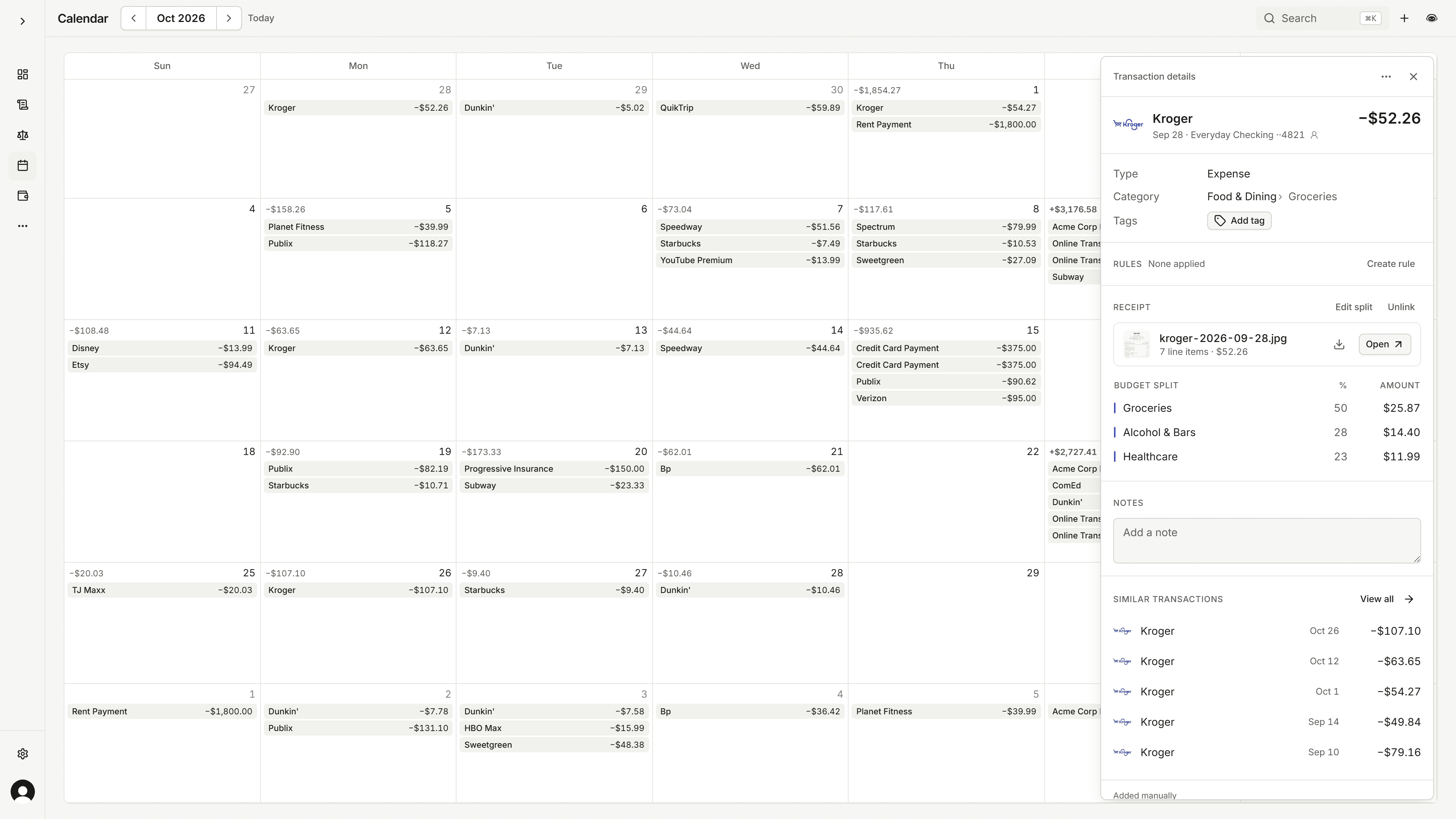
“We are engineers. We wanted to budget without touching the mouse.”

Fast, with a keyboard

Press ⌘K to jump anywhere, add a transaction, or find an account. Go-to shortcuts cover every page.

Receipt tracking

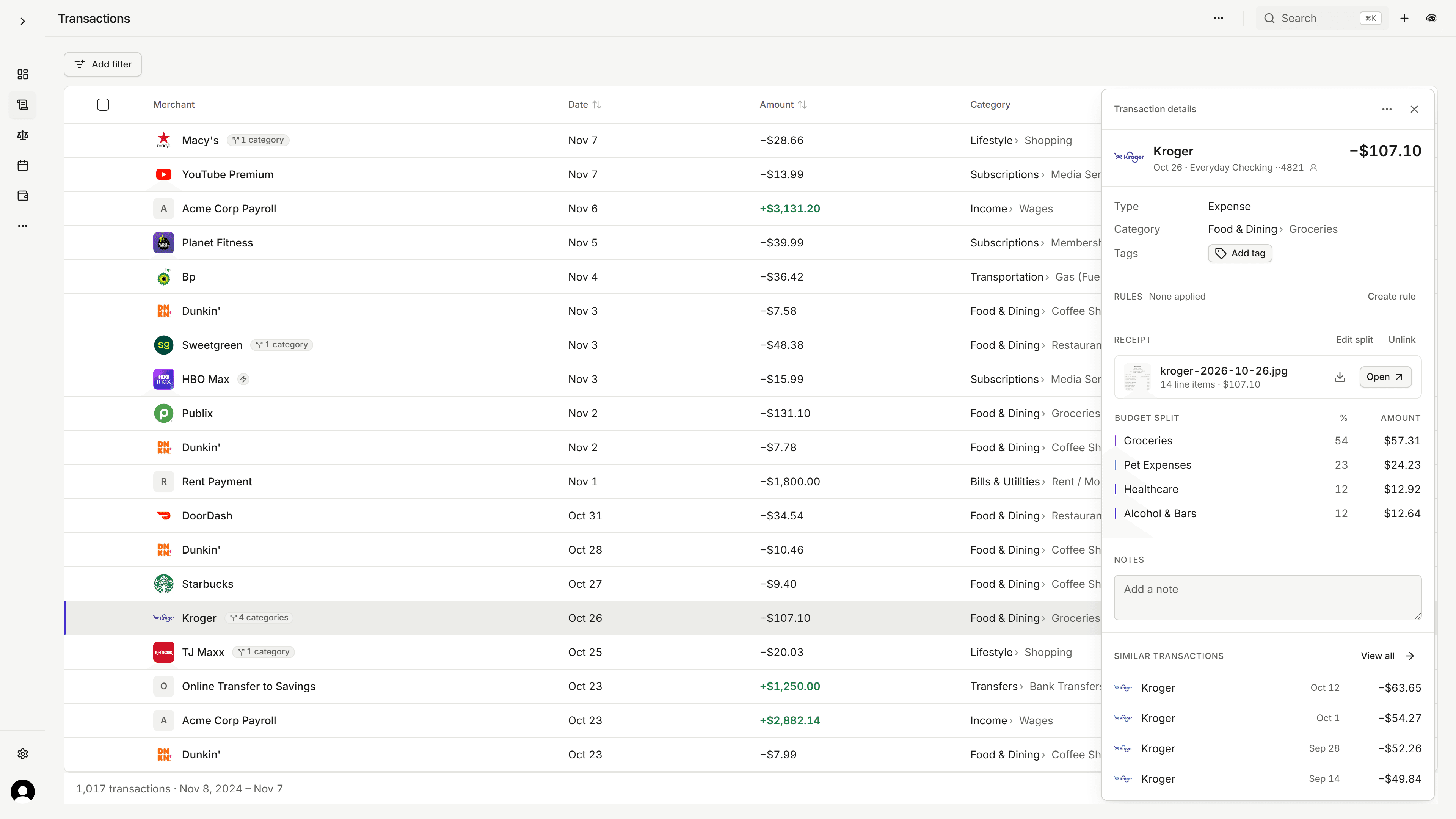
One charge in your bank. Four categories in your budget.

Most budgeting apps stop at the total. A Kroger run is groceries, dog food, ibuprofen, and a bottle of wine, so Copia keeps reading. Set up forwarding once and receipts from Amazon, Uber, and the rest flow in on their own.

  • Forward to your Copia address or take a photo
  • Matched to the transaction it belongs to
  • Line items categorized with your own subcategories
  1. Get a receipt into Copia any of three ways: take a photo, forward the email, or drop the file.
  2. Copia reads the merchant, date, total, card, and all 14 line items.
  3. The receipt is matched to the $107.10 Kroger charge from your bank.
  4. Its items split the charge into Groceries, Pet Expenses, Healthcare, and Alcohol & Bars, with tax spread across them.
  5. Those four budget categories update, and left to budget drops by $107.10.

An expense tracker that reads like a ledger.

Money out is in ink, money in is green, and red only shows up when something needs you. That is the whole color system.

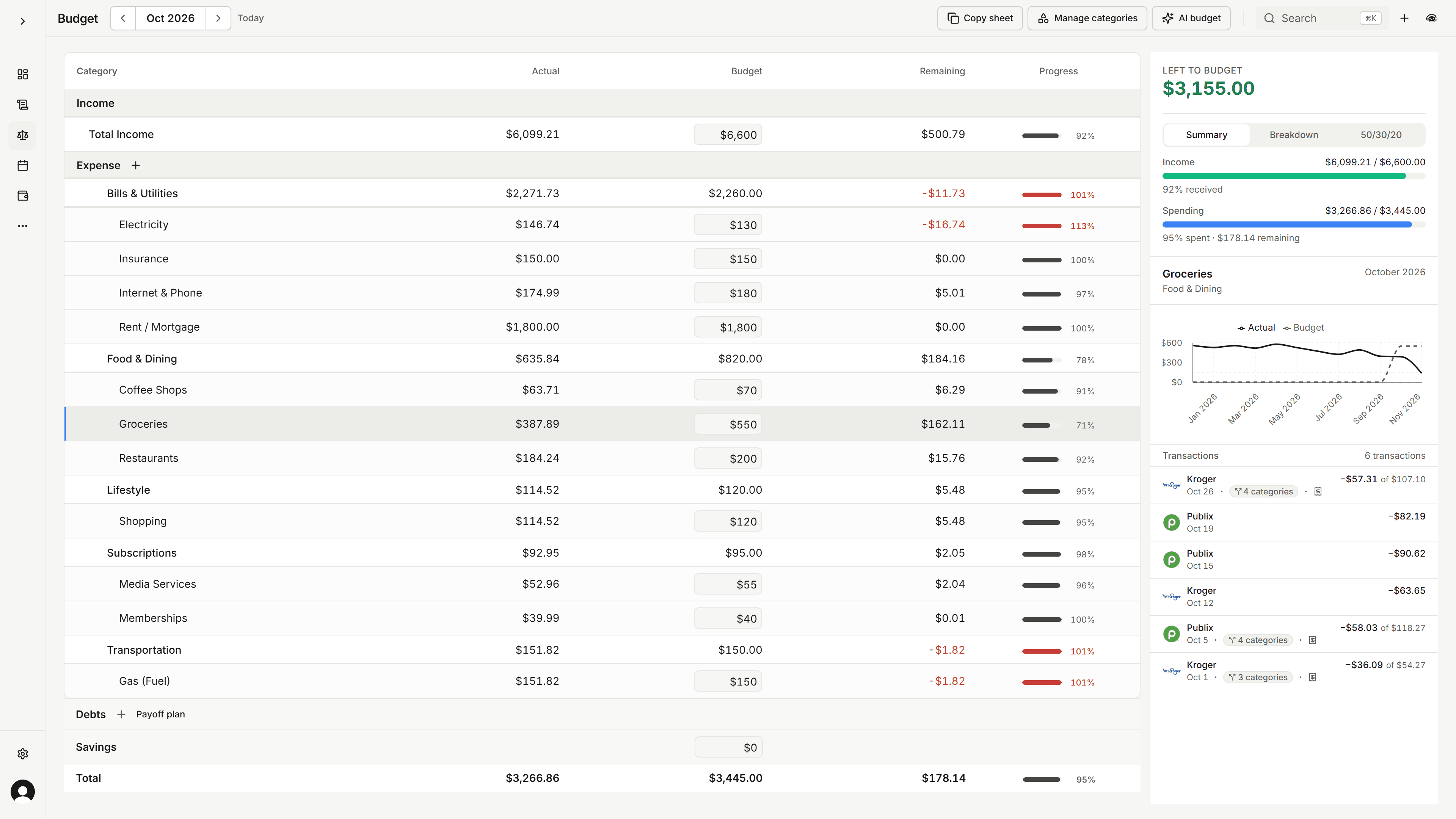
Copia zero-based budget with categories, actual, budget, remaining, and progress

Why an affordable budgeting app costs less

You pay for the app, not for a big company around it.

We are two people building Copia, without a sales team, an ad budget, or an office to cover. That lets us price it at what we would happily pay for a budgeting app ourselves.

If you joined during the beta, you keep the price you signed up at, and we will tell you before the price changes for anyone.

Copia vs. EveryDollar, Copilot, Monarch Money, YNAB, yearly plans priced per month

Each yearly price divided by 12, from our comparison pages. Month to month, Copia is $6.99. See the full comparison

Budgeting app pricing with no fine print.

Start on the free tier and budget by hand. Upgrade when you want your banks and receipts to do the typing.

Free

For budgeting by hand

$0

  • Manual accounts and transactions
  • Full budget view and category tracking
  • Activity charts and spending history
  • Debt payoff planner
  • Quick add, bulk tools, and CSV import
Start free

Copia

Everything, synced

$4.99/month, billed $59.88 yearly

  • Everything in the free tier
  • AI tools
  • Bank connections and auto-sync
  • Receipt capture by email or camera
  • Transaction rules for auto-categorization
Get Copia

Or $6.99 month to month. Cancel from settings anytime.

Who you are trusting with your budget

Two founders. You can message both of us.

Copia began as a spreadsheet-backed side project. When Mint shut down and nothing affordable felt right, it became the thing we work on full time. We answer questions in Discord ourselves.

Join our Discord
“Started Copia as a personal project to manage finances better. Now building it full-time because I couldn't find an affordable budgeting app that worked.”
ADAngel DavilaFounder • Software Engineer
“Co-founder who uses Copia daily. Focused on reliability and building something people actually want to use.”
DLDillon StreatorCo-Founder • Software Engineer

Budgeting app questions people ask us first

Is my bank login information stored?

No. We never see or store your bank login credentials. Copia uses Plaid to establish secure connections to your bank accounts, and all authentication happens through Plaid's secure infrastructure. We only receive transaction data, never your passwords.

Will Copia be available on mobile devices?

Copia works in your mobile browser today. Native iOS and Android apps are in progress and headed to the App Store and Google Play.

Can I export my financial data?

Yes. From the Transactions page you can export the rows you are viewing as a CSV, including whatever filters you have on. CSV import is also available on the free plan if you are bringing history in from another app.

How much does Copia cost?

Copia has a free tier that includes manual accounts, manual transactions, and the full budget view. Bank connections and the complete feature set are $4.99/month billed yearly, or $6.99 month to month. The yearly plan is $59.88 a year. If you subscribed during the beta, you keep the price you signed up at. We built Copia to be affordable because budgeting tools should not cost a fortune.

Read every question

Try it on your own money this weekend.

Start on the free tier, set up a budget by hand, and upgrade only if you want your banks connected.

Copia | Premium Budgeting Without the Premium Price Tag